Sharp R-520E Specifications Page 9: Wireless Remote Commander
 1
 2
 3
 4
 5
 6
 7
 8
 9
 10
 11
 12
 13
 14
 15
 16
 17
 18
 19
 20
 21
 22
 23
 24
 25
 26
 27
 28
 29
 30
 31
 32
 33
 34
 35
 36
 37
 38
 39
 40
 41
 42
 43
 44
 45
 46
 47
 48
 49
 50
 51
 52
 53
 54
 55
 56
 57
 58
 59
 60
 61
 62
 63
 64
 65
 66
 67
 68
 69
 70
 71
 72
 73
 74
 75
 76
 77
 78
 79
 80
 81
 82
 83
 84
 85
 86
 87
 88
 89
 90
 91
 92
 93
 94
 95
 96
 97
 98
 99
 100
 101
 102
 103
 104
 105
 106
 107
 108
 109
 110
 111
 112
 113
 114
 115
 116
 117
 118
 119
 120
 121
 122
 123
 124
 125
 126
 127
 128
 129
 130
 131
 132
 133
 134
 135
 136
9
Table of Contents Useful Recording Techniques Index
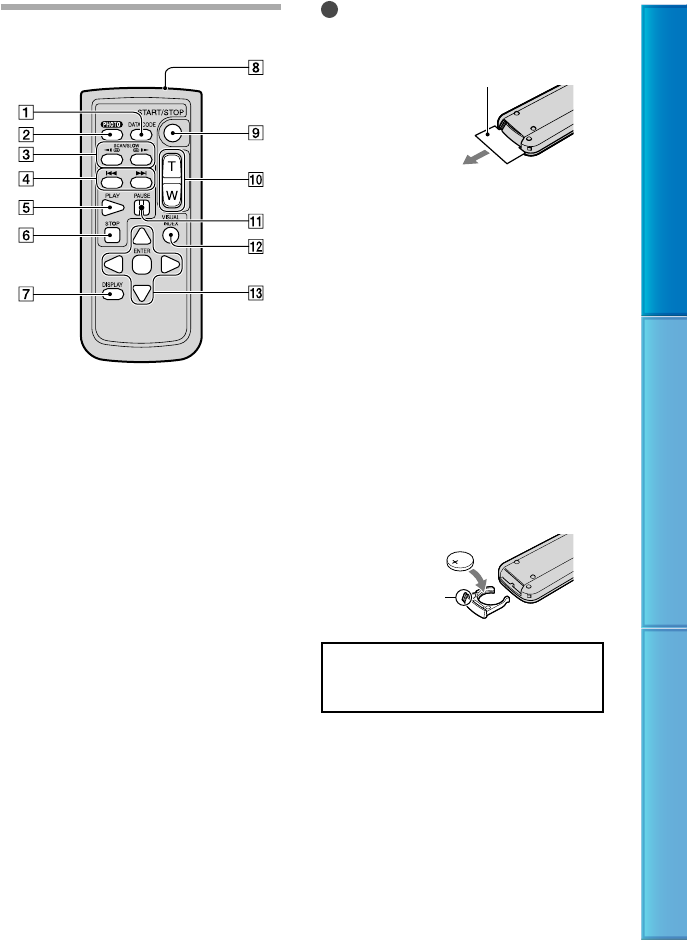
Wireless Remote Commander
DATA CODE button (90)
Displays the date and time, camera setting
data, or coordinates (HDR-XR500V/XR520V)
of the recorded images when you press this
button during playback.
PHOTO button (26, 32)
The on-screen image when you press this
button will be recorded as a still image.
SCAN/SLOW buttons (28, 42)
/ (Previous/Next) buttons (28, 28,
42, 43)
PLAY button (28, 42)
STOP button (28, 42)
DISPLAY button (38)
Transmitter
START/STOP button (25, 30)
Power zoom buttons (34, 49)
PAUSE button (28, 42)
VISUAL INDEX button (26, 41)
Displays a VISUAL INDEX screen during
playback.
////ENTER buttons
When you press any of these buttons, the
orange frame appears on the LCD screen.
Select a desired button or an item with
///, then press ENTER to enter.
Notes
Remove the insulation sheet before using the
Wireless Remote Commander.
Insulation sheet
Point the Wireless Remote Commander
towards the remote sensor to operate your
c
amcorder (p. 9).
When no commands have been sent from the
Wireless Remote Commander within a certain
period, the orange frame disappears. When
you press any of
///, or ENTER again,
the frame appears at the position where it was
displayed last.
You cannot select some buttons on the LCD
screen using
///.
To change the battery of the Wireless
Remote Commander
While pressing on the tab, inset your fingernail
into the slit to pull out the battery case.
Place a new battery with the + side facing up.
Insert the battery case back into the Wireless
Remote Commander until it clicks.
WARNING
Battery may explode if mistreated. Do not
recharge, disassemble or dispose of in fire.
When the lithium battery becomes weak, the
operating distance of the Wireless Remote
Commander may shorten, or the Wireless
Remote Commander may not function
properly. In this case, replace the battery with
a Sony CR2025 lithium battery. Use of another
battery may present a risk of fire or explosion.
Tab
PDF file · ·
Questions about Sharp R-520E
No questions about this manual yet. Ask the first one.
Related products and manuals for Microwaves Sharp R-520E
- Microwaves Sharp R-308CK Specifications

 (27 pages)
- Microwaves Sharp R-90GC Service Manual
(52 pages)
- Microwaves Sharp R-899S User Manual
(8 pages)
- Microwaves Sharp R-402JW Service Manual
(40 pages)
- Microwaves Sharp R-510HW - 1200 Watt Full Size Microwave Service Manual
(27 pages)
- Microwaves Sharp R-1880LS Service Manual
(60 pages)
- Microwaves Sharp R-770B Service Manual
(40 pages)
- Microwaves Sharp R-403KK Service Manual
(44 pages)
- Microwaves Sharp R-342E User Manual
 (2 pages)
- Microwaves Sharp R-200BW Specifications
(123 pages)
- Microwaves Sharp R-501FW Specifications
(24 pages)
- Microwaves Sharp R-404JK Service Manual
(16 pages)
- Microwaves Sharp R-140D Specifications
(24 pages)
- Microwaves Sharp 21HT-16C Service Manual
(44 pages)
- Microwaves Sharp R-320BB User Manual
(8 pages)
- Microwaves Sharp R-880B Service Manual
(48 pages)
- Microwaves Sharp R-204 Service Manual
(36 pages)
- Microwaves Sharp R-120DK Service Manual
(36 pages)
- Microwaves Sharp CD2200M User Manual
 (8 pages)
- Microwaves Sharp R-330DK Service Manual
(44 pages)