Sharp R-520E Specifications Page 68: Insert the recording media in the recording device
 1
 2
 3
 4
 5
 6
 7
 8
 9
 10
 11
 12
 13
 14
 15
 16
 17
 18
 19
 20
 21
 22
 23
 24
 25
 26
 27
 28
 29
 30
 31
 32
 33
 34
 35
 36
 37
 38
 39
 40
 41
 42
 43
 44
 45
 46
 47
 48
 49
 50
 51
 52
 53
 54
 55
 56
 57
 58
 59
 60
 61
 62
 63
 64
 65
 66
 67
 68
 69
 70
 71
 72
 73
 74
 75
 76
 77
 78
 79
 80
 81
 82
 83
 84
 85
 86
 87
 88
 89
 90
 91
 92
 93
 94
 95
 96
 97
 98
 99
 100
 101
 102
 103
 104
 105
 106
 107
 108
 109
 110
 111
 112
 113
 114
 115
 116
 117
 118
 119
 120
 121
 122
 123
 124
 125
 126
 127
 128
 129
 130
 131
 132
 133
 134
 135
 136
68
Table of Contents
Useful Recording Techniques
Index
with the devices to be connected. Select the
recording medium that contains movies
and the image quality you want to dub
before starting the operation (p. 70, 74).
Sony DVD writer may not be available in some
countries/regions.
Notes
Connect your camcorder to the wall outlet
(wall socket) using the supplied AC Adaptor for
this operation (p. 19).
High definition image quality (HD) movies
will be dubbed with standard definition image
quality (SD).
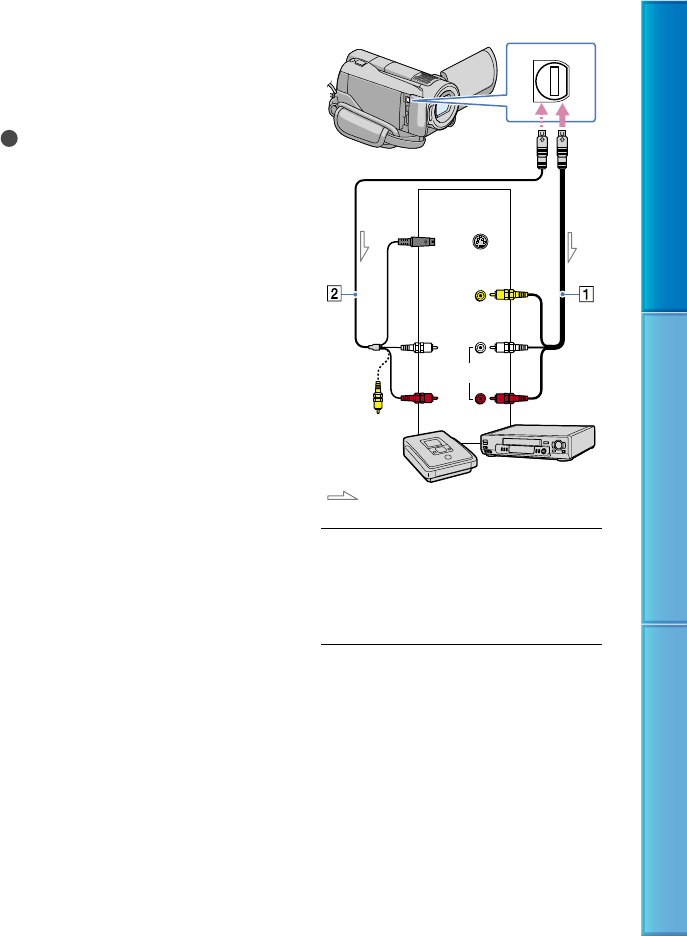
A/V connecting cable (supplied)
Connect the A/V connecting cable to the
input jack of another device.
A/V connecting cable with S VIDEO
(sold separately)
When connecting to another device
via the S VIDEO jack, by using an A/V
connecting cable with an S VIDEO cable
(sold separately), higher quality images can
be produced than with an A/V connecting
cable. Connect the white and red plug
(left/right audio) and the S VIDEO plug
(S VIDEO channel) of the A/V connecting
cable with an S VIDEO cable. If you
connect the S VIDEO plug only, you will
hear no sound. The yellow plug (video)
connection is not necessary.
Insert the recording media in the
recording device.
If your recording device has an input
selector, set it to the input mode.
Connect your camcorder to the
recording device (a disc recorder,
etc.) with the A/V connecting
cable
(supplied) or an A/V
connecting cable with S VIDEO
(sold separately).
Connect your camcorder to the input jacks
of the recording device.
A/V Remote Connector
Signal flow
S VIDEO
VIDEO
(Yellow)
(White)
AUDIO
(Red)
Input
(Yellow)
PDF file · ·
Questions about Sharp R-520E
No questions about this manual yet. Ask the first one.
Related products and manuals for Microwaves Sharp R-520E
- Microwaves Sharp R-308CK Specifications

 (27 pages)
- Microwaves Sharp R-90GC Service Manual
(52 pages)
- Microwaves Sharp R-899S User Manual
(8 pages)
- Microwaves Sharp R-402JW Service Manual
(40 pages)
- Microwaves Sharp R-510HW - 1200 Watt Full Size Microwave Service Manual
(27 pages)
- Microwaves Sharp R-1880LS Service Manual
(60 pages)
- Microwaves Sharp R-770B Service Manual
(40 pages)
- Microwaves Sharp R-403KK Service Manual
(44 pages)
- Microwaves Sharp R-342E User Manual
 (2 pages)
- Microwaves Sharp R-200BW Specifications
(123 pages)
- Microwaves Sharp R-501FW Specifications
(24 pages)
- Microwaves Sharp R-404JK Service Manual
(16 pages)
- Microwaves Sharp R-140D Specifications
(24 pages)
- Microwaves Sharp 21HT-16C Service Manual
(44 pages)
- Microwaves Sharp R-320BB User Manual
(8 pages)
- Microwaves Sharp R-880B Service Manual
(48 pages)
- Microwaves Sharp R-204 Service Manual
(36 pages)
- Microwaves Sharp R-120DK Service Manual
(36 pages)
- Microwaves Sharp CD2200M User Manual
 (8 pages)
- Microwaves Sharp R-330DK Service Manual
(44 pages)