Sharp R-208S User Manual Page 37
- Page / 311
- Table of contents
- TROUBLESHOOTING
- BOOKMARKS

- ED IN CHINA 1
- FOR YOUR RECORDS 2
- 6 PRINTER/SCANNER FUNCTIONS 4
- 7 USER SETTINGS 4
- 9 OPTIONAL EQUIPMENT 4
- 10 APPENDIX 4
- CAUTIONS 5
- SOFTWARE LICENSE 6
- ENVIRONMENTAL INFORMATION 6
- For users in Canada 7
- SAFETY PRECAUTIONS 7
- MAIN FEATURES 9
- 2 IN 1 copy 9
- PREPARATIONS 11
- Operation panel 12
- READY TO COPY 14
- 100% 8.5x11 0 14
- Power off 15
- Power save modes 15
- LOADING PAPER 16
- LOADING THE PAPER TRAY 17
- Envelopes 19
- Print face 20
- PAPER SIZE 21
- 1:8.5X14 21
- MAKING COPIES 22
- Using the RSPF 23
- SELECTING THE TRAY 25
- Normal originals 26
- REDUCTION/ENLARGEMENT/ZOOM 27
- CONVENIENT COPY 28
- FUNCTIONS 28
- The first original 29
- The second original 29
- SORT COPY 31
- SHEET OF PAPER (2 IN 1 copy) 33
- ORIG. SIZE ENTER 34
- 5.5x8.5 34
- CREATING MARGINS WHEN COPYING 36
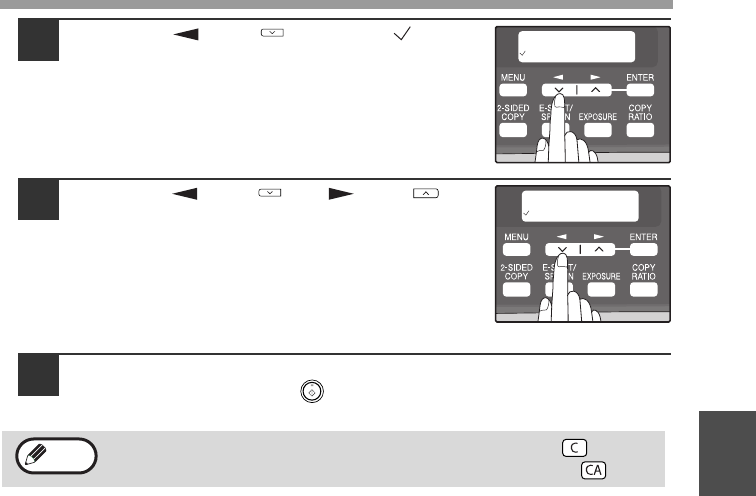
- MARGIN SHIFT 37
- ON OFF 37
- LONG EDGE 37
- Connecting a USB cable 44
- SETTING UP BUTTON MANAGER 47
- Windows 98/Me/2000 49
- PRINTER/SCANNER 51
- USING THE PRINTER MODE 52
- BASIC PROCEDURE FOR PRINTING 52
- USING THE SCANNER MODE 53
- SCANNING FROM YOUR COMPUTER 54
- HOW TO USE THE ONLINE MANUAL 55
- USER SETTINGS 56
- Print mode 60
- Base settings 62
- TROUBLESHOOTING AND 63
- MAINTENANCE 63
- Indication 64
- Cause and remedy Page 64
- Lamp indicator Display 64
- TROUBLESHOOTING THE MACHINE 65
- Play (Windows 2000/XP/Vista) 71
- MISFEED REMOVAL 72
- B: Misfeed in the fusing area 73
- Roller rotating 74
- D: Misfeed in the RSPF 75
- TONER CARTRIDGE REPLACEMENT 76
- 4 or 5 times 77
- Toner seal 77
- SCAN HEAD LOCKING SWITCH 78
- CHECKING THE TOTAL COUNT 79
- MAINTENANCE REQUIRED 79
- CLEANING THE MACHINE 80
- Transfer charger 81
- OPTIONAL EQUIPMENT 82
- Interface cable 83
- °F to 86°F (10°C to 30°C) 85
- Print speed* 20 ppm 86
- Scanner Function 87
- MATERIAL SAFETY DATA SHEET 89
- ........ 30 98
- INDEX BY PURPOSE 100
- For users in the USA 103
- WARNING: 103
- SHARP ELECTRONICS CORPORATION 104
- INTRODUCTION 107
- FCC Notice to users: 108
- TABLE OF CONTENTS 109
- HOW TO USE THE FAX FUNCTION 110
- SPECIAL FUNCTIONS 110
- TROUBLESHOOTING 110
- APPENDIX 110
- QUICK REFERENCE GUIDE 111
- Sending a fax 112
- Receiving a fax 113
- LIST OF FAX FUNCTIONS 114
- INSTALLATION 119
- FINAL PREPARATIONS 120
- INITIAL SETTINGS 121
- 2725 2624 123
- USING THE ARROW KEYS 124
- ADJUSTING THE BEEP VOLUME 124
- ADJUSTING THE RINGING VOLUME 125
- "4:USER PROGRAM" 126
- "17:BEEP LENGTH" 126
- "19:BEEPER VOLUME" 127
- FAX SETUP 128
- "2:ENTRY MODE" 129
- "1:SET" 129
- SETTING THE DATE AND TIME 130
- Press the [MENU] key to 131
- "2:DATE FORMAT" 132
- MEMORY indicator 134
- SELECTING THE RECEPTION MODE 135
- SETTING THE TRAY SELECTION 138
- SETTING THE DIAL MODE 139
- SETTING THE RECALL INTERVAL 142
- SETTING THE INDEX FUNCTION 144
- SETTING RESOLUTION PRIORITY 145
- "15:FAX SIGNAL RCV" 146
- DISTINCTIVE RINGING 149
- "1:FAX NUMBER" 150
- "2:CLEAR" 152
- "3:GROUP KEY" 153
- Press the [ENTER] key 154
- Press the [MENU] key 154
- USING THE MACHINE WITH AN 156
- ANSWERING MACHINE 156
- ANSWERING MACHINE BACKUP 157
- CHOOSING SUITABLE MEDIA 158
- UNSUITABLE ORIGINALS 159
- READING #001 161
- 8.5x11 100% 161
- OPTIONAL TRANSMISSION 162
- SETTINGS 162
- RESOLUTION 163
- CONTRAST 163
- COVER SHEET 164
- MESSAGE FUNCTION 165
- DIALING AND TRANSMITTING 167
- CHAIN DIALING 168
- USING THE SEARCH KEY 169
- REDIALING 169
- IF THE MEMORY BECOMES FULL 170
- WHILE SCANNING AN ORIGINAL 170
- CANCELING (DELETING) A 170
- STORED FAX JOB 170
- RECEIVING FAXES 171
- OPTIONAL RECEPTION SETTINGS 172
- RECEIVE REDUCE 173
- WHEN USING MANUAL SENDING 174
- AND RECEIVING 174
- DATA TRANSFER 176
- "1:DATA TRANSFER" 177
- "1:YES" 177
- TRANSMISSION RESERVATION 178
- BROADCASTING 179
- Original face up 180
- "8:POLLING MODE" 181
- SERIAL POLLING 182
- Selection 183
- "1:ON" 185
- "4:PASSCODE # MODE" 186
- TIMER OPERATIONS 187
- ANTI JUNK FAX 189
- "5:ANTI JUNK FAX" 190
- "2:JUNK FAX #" 190
- OPERATION IN COPY, PRINTER 192
- SCANNER, AND FAX MODES 192
- 6. JUNK FAX # LIST: 194
- 5. PASSCODE LIST: 194
- 7. USER PROGRAM LIST: 195
- ACTIVITY REPORT AUTO LISTING 196
- PRINTING TRANSACTION REPORTS 197
- MESSAGES AND SIGNALS 199
- Fax setup 203
- Faxes, sending and receiving 203
- Special functions 203
- Storing/settings 203
- NOTICE FOR USERS IN 207
- AVIS POUR NOS 207
- UTILISATEURS AU CANADA 207
- AR-NB2 A 209
- CONTENTS 211
- BEFORE USING THE NETWORK 212
- SCANNER FUNCTION 212
- SETTINGS AND PROGRAMMING 213
- REQUIRED FOR THE NETWORK 213
- SCANNER FEATURE 213
- ADMINISTRATOR)" (p.13) 214
- STORING SCANNING SETTINGS 215
- STORING DESTINATIONS 216
- FTP destination information 217
- ABOUT THE WEB PAGE (FOR THE 221
- ADMINISTRATOR) 221
- VARIOUS SERVER SETTINGS 223
- WEB PAGE ([Passwords]) 224
- USING THE NETWORK 225
- Mode" checkbox selected 226
- LOADING ORIENTATION 228
- HOW TO ENTER CHARACTERS 228
- DISPLAY MESSAGES 230
- IF YOUR E-MAIL IS RETURNED 230
- Original image samples 231
- CHECKING THE IP ADDRESS 232
- SHARPDESK CD-ROM 233
- (for Windows) 233
- PROGRAMS 234
- UNINSTALLING THE SOFTWARE 236
- SPECIFICATIONS 237
- SAFETY STANDARDS 240
- BEFORE INSTALLATION 243
- SYSTEM REQUIREMENTS 245
- CONNECTING TO A NETWORK 246
- USER PROGRAMS FOR THE 247
- NETWORK EXPANSION KIT 247
- INSTALLING THE SOFTWARE 248
- USING THE PPD FILE 255
- MAC OS X 257
- Macintosh 258
- MAC OS 9.0 - 9.2.2 261
- (for network printer) 264
- Introduction 265
- How to use the online manual 266
- Contents 267
- Basic printing 269
- Printer driver settings 272
- Two-sided printing 273
- Printing a watermark 278
- Printing text in black 279
- Printer utilities 280
- Using the printer utilities 281
- About the Web pages 286
- Advanced job settings 288
- (part 1) 289
- (part 2) 290
- (part 3) 291
- (part 4) 292
- (part 5) 293
- (part 6) 294
- E-mail print function 297
- Key operator programs 299
- Troubleshooting 304
- Removing the software 305
- Printer specifications 306
- Printer driver specifications 307
Related products and manuals for Printers Sharp R-208S
 (168 pages)
(310 pages)
(2 pages)
(12 pages)
(118 pages)
(4 pages)
(152 pages)
(128 pages)
(224 pages)
(92 pages)
(81 pages)
(372 pages)
(188 pages)
(168 pages)
(310 pages)
(2 pages)
(12 pages)
(118 pages)
(4 pages)
(152 pages)
(128 pages)
(224 pages)
(92 pages)
(81 pages)
(372 pages)
(188 pages)

 (172 pages)
(140 pages)
(72 pages)
(710 pages)
(156 pages)
(140 pages)
(32 pages)
(172 pages)
(140 pages)
(72 pages)
(710 pages)
(156 pages)
(140 pages)
(32 pages)
© 2020, manymanuals.com. All rights reserved. | 0.104 s |
 Manymanuals.com
 Manymanuals.de
 Manymanuals.fr
 Manymanuals.it
 Manymanuals.pl
 Manymanuals.cz
 Manymanuals.es
 Manymanuals-pt.com
Comments to this Manuals