Sharp MX-B400P Setup Guide Page 163
- Page / 249
- Table of contents
- TROUBLESHOOTING
- BOOKMARKS

- Operation Guide 1
- Manual name Contents 2
- ABOUT OPERATION MANUAL 3
- CHAPTER 1 4
- MAINTENANCE 5
- ENTERING TEXT 5
- INTERIOR 8
- SIDE AND BACK 9
- OPERATION PANEL 10
- USING THE OPERATION PANEL 11
- Entering numbers 12
- BEFORE USING THE MACHINE 13
- Entering with the arrow keys 13
- Using the soft numeric keypad 13
- USING THE WEB PAGE 15
- TURNING THE POWER ON AND OFF 16
- ENERGY SAVE FUNCTIONS 17
- [POWER SAVE] KEY 17
- USER AUTHENTICATION 18
- Select the [OK] key 19
- [Quick] key 20
- Select the [Password] key 21
- ACCESSING THE WEB PAGE 23
- USER CONTROL 24
- Factory-stored users 25
- Settings 25
- DEFAULT SETTING 27
- PAGE LIMIT GROUP LIST 29
- AUTHORITY GROUP LIST 30
- FAVORITE OPERATION GROUP LIST 32
- VIEW USER COUNT 33
- Example: RealVNC 34
- SAVE / DELETE JOB LOG 35
- VIEW JOB LOG 35
- ITEMS RECORDED IN THE JOB LOG 36
- STORAGE BACKUP 38
- DEVICE CLONING 39
- LOADING PAPER 40
- Trays 1 to 4 41
- Bypass tray 41
- Paper that cannot be used 42
- Non-recommended paper 42
- Inserting paper 46
- Inserting transparency film 46
- Loading envelopes 47
- PERIPHERAL DEVICES 48
- FINISHER 49
- SHARP OSA 50
- EXTERNAL ACCOUNT APPLICATION 51
- Close the front cover 53
- CONTAINER 55
- DRUM CARTRIDGE 58
- Open the main charger cover 59
- Turn on the power 62
- REPLACING THE DRUM CARTRIDGE 63
- THE FINISHER 65
- REGULAR MAINTENANCE 67
- CLEANING THE LASER UNIT 72
- Clean the laser unit 74
- Replace the cleaning tool 74
- CLEANING THE PT CHARGER 76
- CHAPTER 2 80
- PRINTING FROM WINDOWS 83
- (2) Select the paper size 84
- (3) Click the [OK] button 84
- SELECTING THE PAPER 85
- PRINTING ON ENVELOPES 86
- Start printing 88
- VIEWING PRINTER DRIVER HELP 89
- SAVING FREQUENTLY USED PRINT 90
- SETTINGS 90
- Check and save the settings 91
- Click the [OK] button 91
- USING SAVED SETTINGS 92
- CHANGING THE PRINTER DRIVER 93
- DEFAULT SETTINGS 93
- [OK] button 94
- PRINTING FROM A MACINTOSH 95
- Click the [Print] button 97
- PRINTING WHEN THE USER 100
- (3) Click the [Print] button 101
- FREQUENTLY USED FUNCTIONS 102
- (1) Click the [Advanced] tab 103
- (2) Select [Advanced] 103
- TWO-SIDED PRINTING 104
- [Short-edged binding] 105
- (1) Select [Layout] 105
- Invoice or A5 Letter or A4 106
- PRINTING 107
- Macintosh 108
- STAPLING OUTPUT 109
- CONVENIENT PRINTING FUNCTIONS 111
- (1) Click the [Paper] tab 114
- (3) Select poster settings 114
- ORIENTATION OF THE IMAGE 115
- (Zoom/XY-Zoom) 116
- (Line Width Settings) 117
- IMAGE ADJUSTMENT FUNCTION 119
- ABCD ABCD 120
- CONFIDENTIAL 121
- (Image Stamp) 122
- Create an overlay file 123
- Printing with an overlay file 123
- PRINT FUNCTIONS FOR SPECIAL 124
- PURPOSES 124
- (2) Select [Different Paper] 125
- [Settings] button 127
- [Retention] menu 130
- (1) Select [Job Handling] 131
- PRINTING A STORED FILE 132
- [Print and Save] key 133
- (1) Log into the machine 134
- (2) Perform print all 134
- PRINT SETTINGS SCREEN 135
- MULTI-FILE PRINTING 136
- Printing a selected file 137
- Batch printing 138
- Select the user name 139
- DELETING A STORED FILE 141
- Automatic deletion of files 142
- SEARCHING FOR A STORED FILE 143
- Using the user name to search 144
- Using the file name to search 144
- PRINTING WITHOUT THE PRINTER 145
- Press the [PRINT] key 146
- Access the FTP server 146
- Print the selected file 147
- Access the USB memory device 148
- Access the network 150
- Access the network folder 151
- (1) Select print conditions 152
- (2) Select the [Print] key 152
- SUBMIT PRINT JOB 153
- FTP PRINT 153
- E-MAIL PRINT 154
- CHECKING THE PRINT STATUS 155
- Job key display 156
- Press the [JOB STATUS] key 157
- Select the [Yes] key 157
- GIVING A PRINT JOB 158
- CANCELING A PRINT JOB 159
- PRINTING WHEN PAPER RUNS OUT 160
- Select the [Paper] key 161
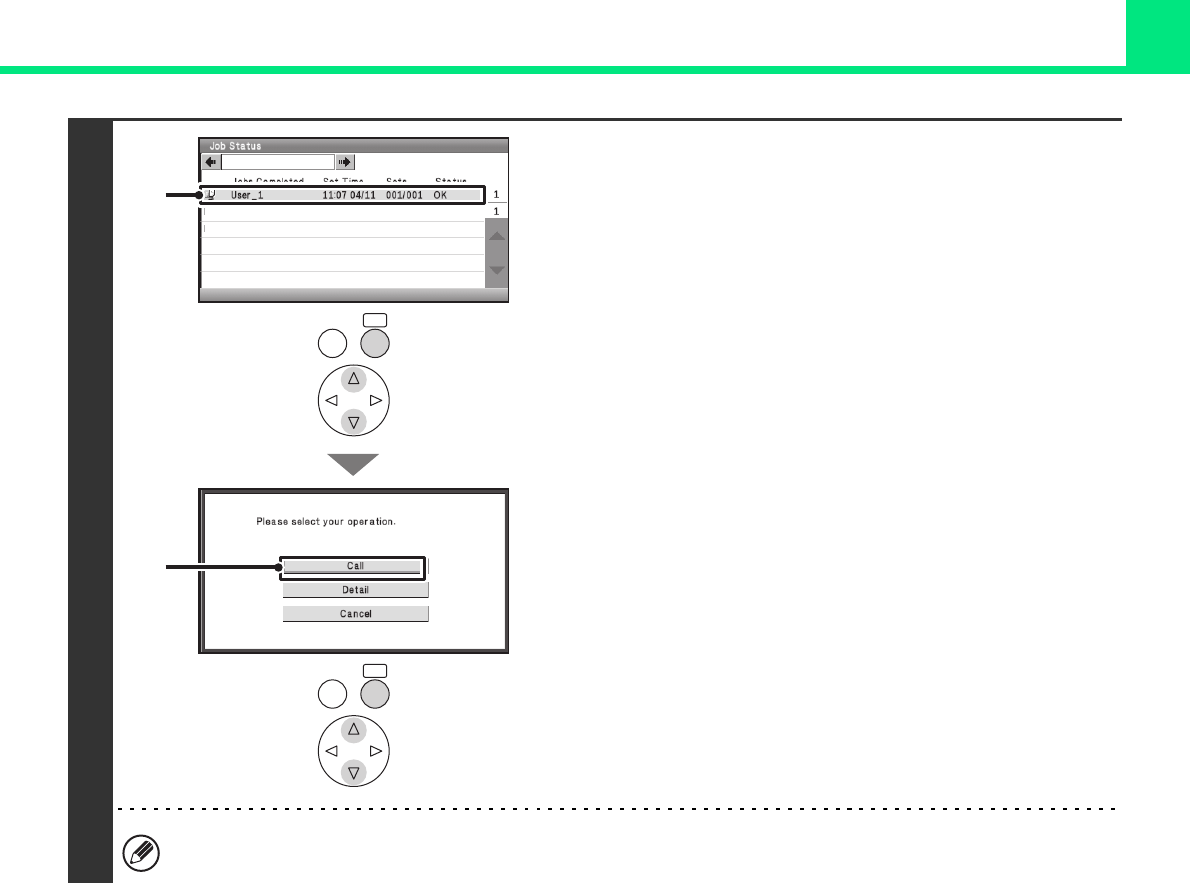
- JOB STATUS SCREEN 162
- APPENDIX 164
- CHAPTER 3 166
- SYSTEM SETTINGS 166
- WEB PAGE 167
- THE WEB PAGE 167
- Common Operation Methods 170
- Opening the Web pages 171
- SYSTEM SETTINGS (GENERAL) ON 172
- THE OPERATION PANEL 172
- Display Contrast 173
- Total Count 173
- Default Settings 173
- List Print (User) 174
- Paper Tray Settings 174
- USB-Device Check 174
- Tray Settings 179
- ON THE OPERATION PANEL 181
- Select the [Login Name] key 182
- (3) Select the [OK] key 183
- (2) Select the [OK] key 184
- Device Control 185
- Energy save 185
- Operation Settings 185
- Network Settings 186
- List Print (Administrator) 186
- Security Settings 186
- Product Key 187
- Sharp OSA Settings 187
- Energy Save 188
- Restore Factory Defaults 194
- Store Current Configuration 194
- Restore Configuration 194
- SYSTEM SETTINGS (GENERAL) IN 196
- Paper Type Registration 197
- Printer Condition Settings 198
- Settings of each tray 203
- PCL Settings 207
- Printer Settings 212
- Print Hold Setting 213
- Enable/Disable Settings 214
- Remote Operation Settings 218
- Interface Settings 221
- Disabling of Stapler 227
- CHAPTER 4 228
- TROUBLESHOOTING 228
- REMOVING MISFEEDS 229
- HOW TO REMOVE MISFEEDS 230
- REMOVING STAPLE JAMS 233
- Replace the staple case 234
- Close the cover 234
- ☞ Software Setup Guide 236
- PROBLEMS RELATED TO FILING 240
- GENERAL PROBLEMS 241
- OTHER PROBLEMS 248
- MXB400P-US-Z1 249
Related products and manuals for Print & Scan Sharp MX-B400P
 (14 pages)
 (60 pages)

 (2 pages)
 (110 pages)
(241 pages)
(4 pages)
(121 pages)
(44 pages)
(6 pages)
(140 pages)
(20 pages)
(257 pages)
(132 pages)
(12 pages)
(38 pages)
(115 pages)
(55 pages)
(110 pages)
(241 pages)
(4 pages)
(121 pages)
(44 pages)
(6 pages)
(140 pages)
(20 pages)
(257 pages)
(132 pages)
(12 pages)
(38 pages)
(115 pages)
(55 pages)
© 2020, manymanuals.com. All rights reserved. | 0.036 s |
 Manymanuals.com
 Manymanuals.de
 Manymanuals.fr
 Manymanuals.it
 Manymanuals.pl
 Manymanuals.cz
 Manymanuals.es
 Manymanuals-pt.com
Comments to this Manuals