Sharp PCMM10 Operations Instructions Page 36

  • Download
  • Add to my manuals
  • Print
  • Page
    / 60
  • Table of contents
  • TROUBLESHOOTING
  • BOOKMARKS
  • Rated. / 5. Based on customer reviews
Page view 35
PCM-D50. US. 3-277-770-11(2)
36
Operations after Recording (continued)
Storing tracks on a computer
Connect the recorder to a computer to save
recorded tracks on the hard disk drive of the
computer.
1
Turn on the power of the recorder.
2
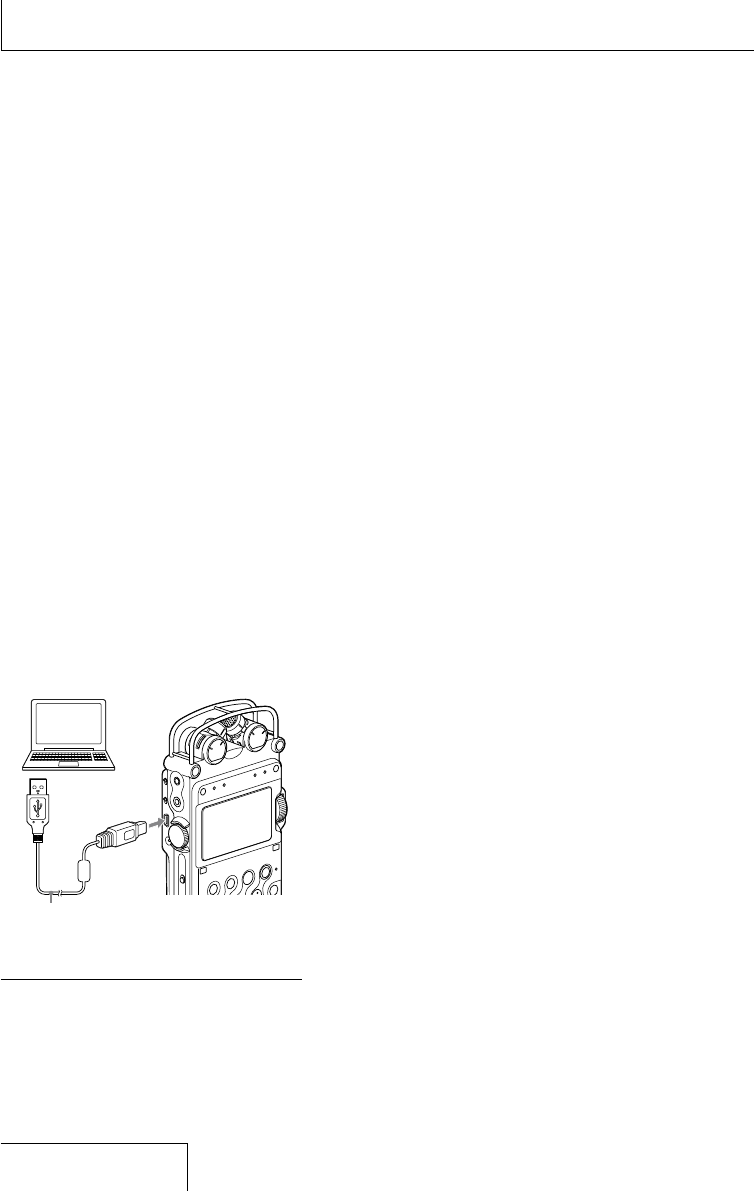
Connect the USB connectors of a
computer and the recorder using the
supplied USB connecting cable.
CONNECTING appears on the display
of the recorder, and it is recognized as a
USB Mass Storage Class device on the
computer.
You cannot operate the recorder while it
is connected to the computer.
During a USB connection, DO NOT
POWER OFF is always displayed. Do not
disconnect the power source or turn the
POWER switch to OFF; if you do so, the
USB connection is forcibly terminated
and data may be damaged.
Computer
(not supplied)
to a USB
connector
to the USB
connector
USB connecting
cable (supplied)
Notes
You cannot play the 24 bit tracks recorded using
this recorder with the Windows Media Player.
Do not use a computer to format the built-in
memory of the recorder or a Memory Stickyou
use with the recorder.
3
The recorder is recognized on Windows
Explorer or Macintosh Desktop as a
removable storage device. Drag and drop
the track file you want to store on the
hard disk drive of the computer.
System requirements for the computer to
be connected to the recorder
1)
Operating Systems*:
Windows Vista
®
Home Basic
Windows Vista
®
Home Premium
Windows Vista
®
Business
Windows Vista
®
Ultimate
Windows
®
XP Home Edition Service Pack
2 or higher
Windows
®
XP Professional Service Pack 2
or higher
Windows
®
XP Media Center Edition Service
Pack 2 or higher
Windows
®
XP Media Center Edition 2004
Service Pack 2 or higher
Windows
®
XP Media Center Edition 2005
Service Pack 2 or higher
Windows
®
2000 Professional Service Pack
4 or higher
Mac OS X (v10.2.8-v10.4)
Pre-Installed
The operating systems other than those listed
above are not supported.
The 64bit OS is not supported.
The sleep mode of the Mac OS is not supported.
Hardware Environment:
Port: USB port
Required when you save a recorded WAV file on a
PC via a USB connection.
*
*
*
1)
Page view 35
1 2 ... 31 32 33 34 35 36 37 38 39 40 41 ... 59 60

Comments to this Manuals

No comments

ViewSonic PJ759 - 63 Tft LCD Projector Handbücher

Bedienungsanleitungen und Benutzerhandbücher für Datenprojektoren ViewSonic PJ759 - 63 Tft LCD Projector.
Wir stellen 1 PDF-Handbücher ViewSonic PJ759 - 63 Tft LCD Projector zum kostenlosen herunterladen nach Dokumenttypen zur Verfügung Betriebsanweisung


Weitere Produkte und Handbücher für Datenprojektoren ViewSonic

Modelle Dokumententyp
PJD5123 Betriebsanweisung   ViewSonic PJD5123 User guide, 53 Seiten
PJD6543w Betriebsanweisung   ViewSonic PJD6543w User guide, 90 Seiten
PJD5112 - s SVGA DLP Projector Betriebsanweisung   ViewSonic PJD5112 - s SVGA DLP Projector User guide, 43 Seiten
PJ400-2 Spezifikationen   ViewSonic PJ400-2 Product specifications, 61 Seiten
VP730 Bedienungsanleitung   ViewSonic VP730 User manual [en] , 68 Seiten
VS11935 Betriebsanweisung   ViewSonic VS11935 User guide, 36 Seiten
PJ359 Betriebsanweisung   ViewSonic PJ359 User guide, 72 Seiten
PJL7201 Betriebsanweisung   ViewSonic PJL7201 User guide, 73 Seiten
PJ560DC Betriebsanweisung   ViewSonic PJ560DC User guide, 36 Seiten
PJD5231 Betriebsanweisung   ViewSonic PJD5231 User guide [en] , 69 Seiten
DLP PROJECTOR PJD7400 Betriebsanweisung   ViewSonic DLP PROJECTOR PJD7400 User guide, 82 Seiten
PJD6211P Betriebsanweisung   ViewSonic PJD6211P User guide, 42 Seiten
PJ557D - XGA DLP Projector Betriebsanweisung   ViewSonic PJ557D - XGA DLP Projector User guide, 36 Seiten
Pro8520HD Betriebsanweisung   ViewSonic Pro8520HD User guide, 68 Seiten
VS11481 Betriebsanweisung   ViewSonic VS11481 User guide, 19 Seiten
PJ359w - WXGA LCD Projector Betriebsanweisung   ViewSonic PJ359w - WXGA LCD Projector User guide, 72 Seiten
PJ458D - XGA DLP Projector Betriebsanweisung   ViewSonic PJ458D - XGA DLP Projector User guide [en] , 44 Seiten
PJD7820HD Betriebsanweisung   ViewSonic PJD7820HD User guide, 84 Seiten
PJD7383 Betriebsanweisung   ViewSonic PJD7383 User guide, 95 Seiten
PJ558D DLP Projector VS11529 Betriebsanweisung   ViewSonic PJ558D DLP Projector VS11529 User guide, 43 Seiten