Sharp SF-1014 Service Manual Page 36
- Page / 153
- Table of contents
- BOOKMARKS

- SERVICE MANUAL 1
- MODEL SF-1014 1
- CONTENTS 2
- [1] GENERAL DESCRIPTION 4
- [2] PRODUCT SPECIFICATIONS 5
- Middle and South America 7
- Lower unit 9
- 2 3 5 6 7 8 9 10 11 12 13 14 10
- 3. Cross section 11
- 5. Clutches, solenoids 13
- 6. Motors 14
- 1. Packing drawing 16
- 2. Installation 16
- (2) Space around the machine 17
- (3) Installing table 17
- (4) Power source 17
- (5) Grounding 17
- Mirror unit fixing screw 18
- Toner cartridge 19
- Release lever (B) 19
- (4) Toner supply 20
- (6) Accessory attachment 20
- Installation Manual 21
- Multi bypass feeder unit 22
- [5] GENERAL DESCRIPTIONS OF 23
- EACH SECTION 23
- 3. Fuser, paper exit section 24
- 4. Developer section 24
- 5. Optical system 25
- 5-2. Basic operations 26
- 6. Copy process 28
- Cleaning blade 29
- Transfer corona unit 29
- Step 3 (Main Charging) 30
- Step 4 (Exposure) 30
- Step 5 (Development) 31
- Step 6 (Transfer) 32
- Step 7 (Separation) 32
- Step 8 (Cleaning) 33
- Step 9 (Discharging) 33
- (5) Process correction system 34
- 2) Correction operation 34
- [Initial setting] 35
- [Correction timing] 35
- [Correction operation] 35
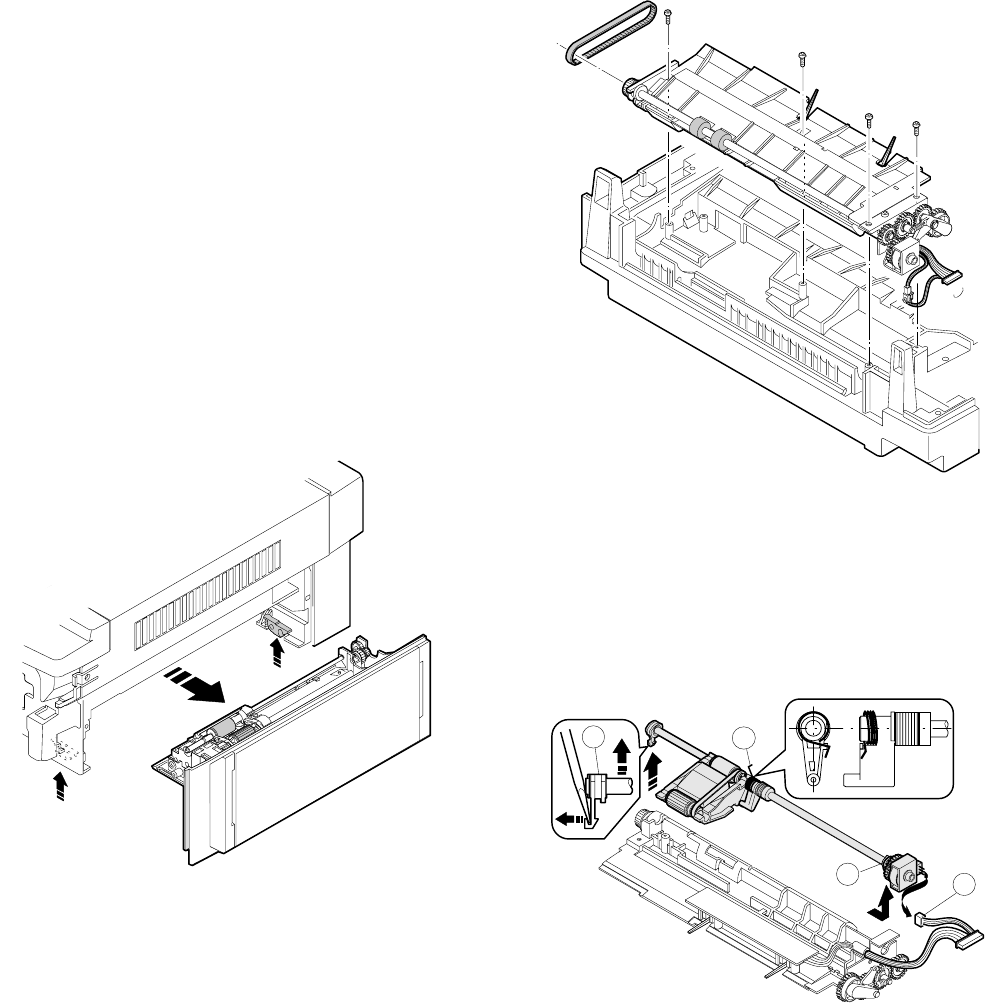
- [6] DISASSEMBLY AND ASSEMBLY 36
- 1-3. Separation roller 37
- One-way clutch side 38
- 1-6. Transport belt 39
- 1-7. Socket holder unit 39
- 1-8. Lower unit PWB 39
- 1-10. Power unit 39
- 2. Manual paper feed section 40
- 3. Fuser section 41
- Paper exit paper guide 43
- 4. Optical system 44
- Wire fixing screw 44
- 4-6. Optical unit removal 46
- 5. Drum section 48
- 6. Developer section 48
- 6-4. Toner density sensor 49
- 8-1. Ozone filter 49
- 8-4. Transport roller clutch 50
- 8-5. Paper exit sensor 50
- 8-3. Ventilation fan motor 50
- [7] ADJUSTMENTS 51
- 0.625±0.03mm 52
- 2. Optical section 53
- Optical unit cover 56
- Optical unit 56
- Document Copy A Copy B 57
- Cam fixing screw 58
- Do not move 58
- Scanner unit drive pulley 59
- Set screw 59
- No.2 scanner unit 60
- Positioning plate 60
- Document Copy C Copy D 61
- Change the right side 62
- Change the left side 62
- Copy paper 63
- No.4/5 mirror drive lever 64
- No.4/5 mirror unit frame 64
- Copy image size 66
- Original size 66
- Shizuoka 67
- Paper exit 68
- Half-tone copy 68
- Less exposure 68
- (Dark copy) 68
- Scale image lead edge 69
- Enlargement copy (x 1.54) 69
- 10 20 30 70
- current void area (mm) 71
- 3. COPY DENSITY ADJUSTMENT 73
- Not copied 74
- adjustment 75
- Slightly copied 76
- Tension spring 77
- [8] SIMULATIONS 78
- 4. Purpose list 79
- 5. Details of simulations 80
- EXP1~5 voltage 87
- Full power 87
- 6. User simulation 89
- (2) User simulation prcedure 90
- (3) User program code table 90
- [9] SELF DIAG 91
- 4. Self diag contents 92
- 1) Paper feed section 97
- 2) Transport section 97
- [10] SERVICING AT MEMORY 98
- TROUBLE AND MAIN 98
- CONTROL PWB REPLACEMENT 98
- 4. Set value recording sheet 101
- 5. Memory simulation list 102
- [11] MAINTENANCE 103
- [12] ELECTRICAL SECTION 104
- M37702M2-XXXFP 105
- 3 Block diagram 106
- IN XIN IN Clock IN 107
- OUT XOUT OUT Clock OUT 107
- H=+32V, VB=+24V 108
- 1 General 109
- Stepping motor time chart 110
- (9) Reset IC (IC113) 111
- 1 Outline 111
- 2 Operation 111
- V3' 112
- (1) Outline 114
- (2) Display circuit 115
- 1 Block diagram 115
- (3) LED display 116
- • AC PWB unit 116
- • In the main PWB unit 117
- COPYRIGHT 119
- 1997 BY SHARP CORPORATION 119
- SF-1014 120
- DEFINITION 121
- FCP02601 123
- FCP02602 124
- NO. PARTS CODE 125
- DESCRIPTION 125
- – 6 – – 7 – 126
- – 8 – – 9 – 127
- – 10 – – 11 – 128
- FCP02605 129
- – 18 – – 19 – 130
- – 22 – – 23 – 132
- FCP02616 137
- FCP02617 142
- PARTS CODE NO 147
Related products and manuals for Copiers Sharp SF-1014
 (159 pages)
(42 pages)
(200 pages)
(12 pages)
(56 pages)
(208 pages)
(19 pages)
(4 pages)
(68 pages)
(159 pages)
(42 pages)
(200 pages)
(12 pages)
(56 pages)
(208 pages)
(19 pages)
(4 pages)
(68 pages)
 (32 pages)
(95 pages)
(31 pages)
(43 pages)
(80 pages)
(82 pages)
(42 pages)
(42 pages)
(149 pages)
(80 pages)
(32 pages)
(95 pages)
(31 pages)
(43 pages)
(80 pages)
(82 pages)
(42 pages)
(42 pages)
(149 pages)
(80 pages)
© 2020, manymanuals.com. All rights reserved. | 0.091 s |
 Manymanuals.com
 Manymanuals.de
 Manymanuals.fr
 Manymanuals.it
 Manymanuals.pl
 Manymanuals.cz
 Manymanuals.es
 Manymanuals-pt.com
Comments to this Manuals