Sharp AR-M355N User Manual Page 126
- Page / 380
- Table of contents
- TROUBLESHOOTING
- BOOKMARKS

- AR-M355N 1
- AR-M455N 1
- FOR YOUR RECORDS 2
- Part 1: General Information 3
- PRODUCT CONFIGURATIONS 4
- OPERATION MANUALS 4
- INSTALLATION REQUIREMENTS 5
- CAUTIONS 6
- Laser Information 7
- CHAPTER 1 10
- INTRODUCTION 11
- MAIN FEATURES 12
- Original Copy 13
- See page 3-8 16
- Non-Offset mode 16
- Energy saving features 17
- ENERGY STAR 17
- ENERGY STAR 17
- PART NAMES AND FUNCTIONS 18
- Interior 19
- ■ Other optional equipment 21
- Operation panel 22
- Touch panel 23
- "JOB QUEUE" screen 24
- "COMPLETE" 24
- TURNING THE POWER ON AND OFF 26
- AUDITING MODE 27
- LOADING PAPER 29
- Specifications of paper trays 30
- ■ User type 32
- Tray 2 and the bypass tray 33
- PAPER TYPE REGISTRATION 34
- Printing onto envelopes 36
- ■ Loading transparency film 37
- Upper paper tray: 37
- Middle and lower paper trays: 37
- Lower paper tray: 38
- T 12-HOUR 40
- About the settings 41
- REPLACING THE TONER CARTRIDGE 42
- STORAGE OF SUPPLIES 43
- MISFEED REMOVAL 44
- Roller rotating knob A 45
- Transfer roller 45
- Photoconductive drum 45
- Roller rotating knob B 45
- Fusing unit open tab 45
- Misfeed in the duplex module 46
- ■ Misfeed in paper tray 1 47
- REMOVING AN ORIGINAL MISFEED 49
- DUPLEX MODULE 55
- MAIL-BIN STACKER 58
- Top cover 59
- FINISHER 60
- Finisher functions 61
- Using the finisher functions 62
- Staple cartridge replacement 63
- ■ Checking the staple unit 64
- Misfeed in the finisher 65
- SADDLE STITCH FINISHER 67
- Non-offset mode 68
- <Example> 70
- {Original 2} 70
- {Punch positions} 70
- {Original 1} 70
- Roller rotating 72
- Staple unit 72
- Roller rotating knob D 76
- Part 2: Copier Operation 78
- AUTOMATIC DOCUMENT FEEDER 81
- PLACING ORIGINALS 82
- Document feeder tray 83
- Document glass 83
- [Example 1] 83
- [Example 2] 83
- CHECKING THE SIZE OF A PLACED 84
- STORING, DELETING, AND USING 85
- ORIGINAL SIZES 85
- NORMAL COPYING 86
- 2-SIDED COPY 87
- DED COPY 89
- Original scale 90
- ADJUSTING THE EXPOSURE 93
- REDUCTION/ENLARGEMENT/ZOOM 94
- PAPER SELECT 95
- COPY RATIO 95
- SPECIAL PAPERS 99
- CHAPTER 5 100
- SPECIAL MODES 101
- Margin shift 102
- CANCEL OK 103
- Dual page copy 104
- Pamphlet copy 105
- PRINT ON COVER 106
- Job build 107
- Tandem copy 108
- Press the [START] key 109
- Covers/inserts 110
- COVERS/INSERTS 111
- TRANSPARENCY 111
- CARD SHOTBOOK COPY 111
- (X) (Y) (Z) 113
- Touch the [PAGE LAYOUT] key 114
- Insert sheets 121
- Originals (1-sided) 121
- Originals (2-sided) 121
- Multi shot 122
- Shot number 123
- Book copy 124
- Card shot 125
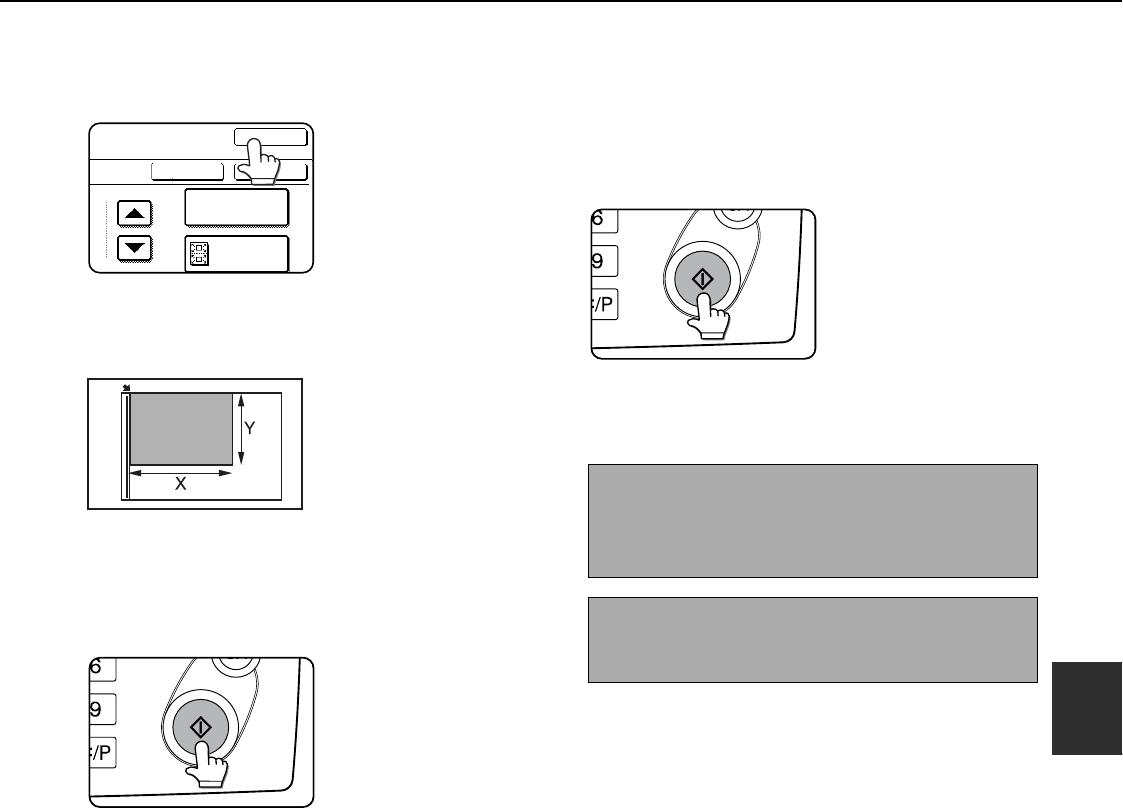
- SIZE RESET 126
- Mirror image 127
- B/W reverse 127
- CONFIDENTIAL 128
- PRINT MENU 129
- 2-SIDED ORIGINAL TYPE 130
- ■ Printing the date on copies 131
- NUMBERING 132
- Print settings Front 134
- Storing text sequences 138
- SELECTED ITEM? 139
- DELETE MOVE 139
- STORING, USING AND DELETING 140
- JOB PROGRAMS 140
- Calling up a job program 141
- Deleting a stored job program 141
- INTERRUPTING A COPY RUN 142
- CHAPTER 6 144
- USER MAINTENANCE 145
- TROUBLESHOOTING 146
- CHAPTER 7 147
- OVERVIEW 148
- A look at the operation panel 150
- Saving files 150
- Document filing icons 151
- SAVING A DOCUMENT IMAGE FILE 152
- ORIGINAL 153
- EXPOSURE 153
- PASSWORD 154
- Print jobs 155
- Scan Save 156
- HALF TONE 157
- Touch the [SPECIAL MODES] 158
- CALLING UP AND USING A FILE 159
- SEARCH START 160
- FILE FOLDER 161
- QUICK FILE 161
- FILE RETRIEVE 161
- JOB SETTINGS 162
- 8 "x11" 162
- ■ [Send] 163
- ■ [Property change] 164
- Touch the [OK] key 165
- Touch the [MOVE] key 165
- Touch the [CANCEL] key 165
- COMPLETE 166
- CUSTOM SETTINGS 167
- ■ Programming a user name 168
- AMEND/DELETE USER NAME 169
- AMEND/DELETE CUSTOM FOLDER 169
- UVWXYZOPQRSTJKLMNEFGHIABCD 169
- ALL USERS 169
- EFGHI JKLMN OPQRST UVWXYZ 170
- DELETE THE FOLDER? 171
- USER FOLDER 1 171
- ENTERING CHARACTERS 172
- \?/"; : 173
- <> ! * 173
- CHAPTER 8 175
- SPECIFICATIONS 176
- LwA 6.8B or less 5.0B or less 177
- KEY OPERATOR'S 184
- OPERATION MANUAL 185
- Trademark Acknowledgments 186
- Warranty 186
- TABLE OF CONTENTS 187
- SETTING THE PRINTER DRIVER 189
- Click [Help] to display the 190
- Help screen 190
- Printing 191
- Click the [Paper] tab 192
- Using options to print 193
- CHAPTER 2 195
- SELECTING PRINTING FUNCTIONS 196
- [Example] 198
- Vertical paper feeding 198
- Horizontal paper feeding* 198
- Offset mode Non-offset mode 199
- Settings in the [Paper] tab 200
- Original 201
- CHAPTER 3 210
- Advanced job settings 213
- ABOUT THE WEB PAGES (FOR THE 214
- ADMINISTRATOR) 214
- ([Passwords]) 215
- Touch the [PRINT] key 217
- E-mail Print 218
- CHAPTER 4 221
- MAKING CONFIGURATION SETTING 222
- (1 999) 223
- Printer Default settings 224
- PCL settings 225
- PostScript settings 225
- KEY OPERATOR PROGRAMS 227
- SETTINGS 228
- KEY OPERATOR 228
- O E H NGE 228
- Key operator program menu 229
- Printer settings 230
- Network settings 232
- Checking the IP address 236
- PRINTER SPECIFICATIONS 238
- NOTICE PAGE PRINTING 239
- PRINT AREA 240
- PURPOSE OF THE KEY OPERATOR 241
- PROGRAMS 241
- KEY OPERATOR PROGRAM LIST 243
- KEY OPERATOR CODE 244
- GENERAL PROGRAMS 247
- Job log control 249
- Energy save 249
- KEYS TOUCH SOUND 250
- Device control 251
- with the 252
- Key operator code change 253
- Product key 253
- PROGRAMS FOR COPY MODE 254
- DOCUMENT FILING PROGRAMS 256
- SOFTWARE SETUP GUIDE 258
- (for printer) 258
- ABOUT THE CD-ROMS 261
- Installation method 1 263
- Installation method 2 269
- Installation method 3 271
- Installation method 4 273
- UNINSTALLING PRINTER DRIVERS 274
- AND PRINTER UTILITIES 274
- INSTALLING PRINTER DRIVERS 275
- CONNECTING THE MACHINE TO 277
- YOUR COMPUTER 277
- CONTENTS 281
- A FACSIMILE 283
- FCC NOTICE TO USERS 284
- IMPORTANT SAFETY INFORMATION 285
- NOTICE FOR USERS IN 286
- AVIS POUR NOS 286
- UTILISATEURS AU CANADA 286
- POINTS TO CHECK AND PROGRAM 289
- AFTER INSTALLATION 289
- CONNECTING AN EXTENSION PHONE 289
- A LOOK AT THE OPERATION PANEL 290
- ■ Condition settings screen 291
- Storing order 292
- (initially selected) 292
- ORIGINALS 293
- LOADING A DOCUMENT 294
- (2 1/2 17) 295
- (2 1/2 11 5/8) 295
- USING A STORED ORIGINAL SIZE 296
- SELECTING THE RESOLUTION 297
- SELECTING THE EXPOSURE 298
- CONVENIENT DIALING METHODS 299
- SENDING A FAX 301
- INAL. (Pg.No.2) 302
- PRESS [READ-END] 302
- TRANSMISSION BY AUTO-DIALING 303
- CANCEL SEARCH 304
- E-MAIL/FTP 305
- MODE SWITCH 305
- INTERNET FAX 305
- FAXING A TWO-SIDED ORIGINAL 306
- CANCELING A FAX TRANSMISSION 308
- RECEIVING FAXES 309
- (BROADCAST TRANSMISSION) 311
- USING BROADCAST TRANSMISSION 312
- USING EDGE ERASE 313
- ■ Selecting Dual Page Scan 314
- AUTOMATIC TRANSMISSION AT A 315
- TRANSMITTING TWO ORIGINAL 316
- PAGES AS A SINGLE PAGE (2in1) 316
- USING CARD SHOT 317
- SEND PAGE 318
- FAXING A LARGE NUMBER OF 319
- PAGES (JOB BUILD MODE) 319
- OWN NUMBER SENDING 320
- PRINTING OUT THE RESULT OF A 321
- TRANSMISSION AND RECEPTION 322
- USING THE POLLING FUNCTION 322
- USING POLLING MEMORY 324
- PUBLIC BOX 325
- USING A PROGRAM 326
- USING THE TRANSFER FUNCTION 327
- Transmission to 328
- TRANSMISSION BETWEEN MACHINES 331
- SUPPORTING F-CODES 331
- ADDRESS AND PASSCODE 332
- F-CODE POLLING MEMORY 333
- PROCEDURE FOR F-CODE POLLING 334
- Your machine 335
- The other machine 335
- CONFIDENTIAL MEMORY BOX 336
- USING AN EXTENSION PHONE 341
- (see page 1-8) 343
- PROGRAMMING 345
- AUTO DIAL KEYS AND PROGRAMS 345
- STORING ONE-TOUCH DIAL KEYS 346
- E-MAIL FAX 347
- [EXIT] key 348
- STORING A GROUP KEY 349
- AMEND/DELETE 350
- DELETE EXIT 350
- STORING A PROGRAM 351
- EDITING AND DELETING PROGRAMS 351
- STORING A GROUP INDEX 352
- PROGRAMMING, EDITING, AND 353
- DELETING F-CODE MEMORY BOXES 353
- (POLLING TIMES) 354
- MEMORY BOXES (PRINT PIN) 355
- BOXES (RECIPIENT) 356
- LIST PRINT 357
- FAX DATA 357
- RECEIVE/FORWARD 357
- VIEWING THE COMMUNICATION 360
- ACTIVITY REPORT 360
- WHEN AN ALARM SOUNDS AND A 360
- WARNING MESSAGE IS DISPLAYED 360
- PROBLEMS AND SOLUTIONS 361
- OPERATION SETTINGS 367
- FAX SETTINGS 368
- Call timer at memory sending 371
- Quick on line sending 371
- Recall in case of line busy 371
- ANTI JUNK FAX SETTING 373
- PRINTING OUT SETTINGS 374
- CHAPTER 9 376
Related products and manuals for Printers Sharp AR-M355N
 (181 pages)
(799 pages)
(655 pages)
(88 pages)
(118 pages)
(121 pages)
(46 pages)
(47 pages)
(28 pages)
(88 pages)
(2 pages)
(849 pages)
(32 pages)
(84 pages)
(52 pages)
(140 pages)
(58 pages)
(2 pages)
(6 pages)
(116 pages)
(181 pages)
(799 pages)
(655 pages)
(88 pages)
(118 pages)
(121 pages)
(46 pages)
(47 pages)
(28 pages)
(88 pages)
(2 pages)
(849 pages)
(32 pages)
(84 pages)
(52 pages)
(140 pages)
(58 pages)
(2 pages)
(6 pages)
(116 pages)
© 2020, manymanuals.com. All rights reserved. | 0.060 s |
 Manymanuals.com
 Manymanuals.de
 Manymanuals.fr
 Manymanuals.it
 Manymanuals.pl
 Manymanuals.cz
 Manymanuals.es
 Manymanuals-pt.com
Comments to this Manuals