Sharp HT-SB500 Specifications Page 31

  • Download
  • Add to my manuals
  • Print
  • Page
    / 33
  • Table of contents
  • TROUBLESHOOTING
  • BOOKMARKS
  • Rated. / 5. Based on customer reviews
Page view 30
DE (1)
FR (2)
ES (3)
SV (4)
IT (5)
NL (6)
PT (7)
ZH (8)
EN (9)
AR (10)
E-18
HT-SB500
2009 October 6
HT-SB500_A6_EN.fm
ENGLISH
References
Troubleshooting chart
Many potential problems can be resolved by the owner without calling
a service technician.
If something is wrong with this product, check the following before
calling your authorised SHARP dealer or service centre.
General
Remote control
Condensation
Sudden temperature changes, storage or operation in an extremely
humid environment may cause condensation inside the cabinet or on
the transmitter on the remote control.
Condensation can cause the speaker to malfunction. If this happens,
leave the power on until normal operation is possible (about 1 hour).
Wipe off any condensation on the transmitter with a soft cloth before
operating the speaker.
If problem occurs
When this product is subjected to strong external interference
(mechanical shock, excessive static electricity, abnormal supply voltage
due to lightning, etc.) or if it is operated incorrectly, it may malfunction.
If such a problem occurs, do the following:
1.
Set the speaker to the stand-by mode and turn the power on again.
2.
If the speaker is not restored in the previous operation, unplug
and plug in the speaker, and then turn the power on.
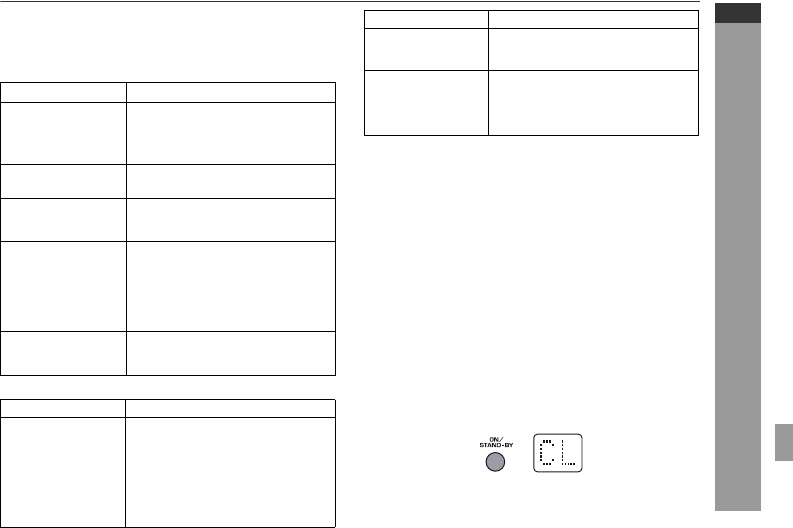
Factory reset, clearing all setting
Make sure to disconnect all audio input cables attached to the speaker
before performing the factory reset.
Can be operated on the remote control only.
1.
Press the ON/STAND-BY button to enter the power stand-by mode.
2.
Press and hold the ON/STAND-BY button until “CL” appears.
Caution:
This operation will erase all data stored in memory.
Symptom Possible cause
No sound is heard.
Is the input signal (selection) set
properly?
Is the volume level set to “0”?
Is muting activated?
Noise is heard during
playback.
Move the speaker away from any
computers or mobile phones.
When a button is
pressed, the speaker
does not respond.
Set this speaker to the stand-by mode
and then turn it back on.
The power is not turned
on.
Is the speaker unplugged? (Refer to
page 13)
The protection circuit may be
activated. Unplug and plug in the
power lead again after 5 minutes or
more.
The information is not
displayed even if the
unit is turned on.
Is the unit set to “Dimmer display off”
mode?
Symptom Possible cause
The remote control does
not operate properly.
Is the battery polarity correct?
Is the battery dead?
Is the distance or angle incorrect?
Are there any obstructions in front of the
speaker?
Is there a strong light shining on the
remote sensor?
Is the remote control for another
equipment used simultaneously?
Symptom Possible cause
The speaker cannot be
turned on with the
remote control.
Is the AC power lead of the speaker
plugged in?
Is the battery inserted?
TV cannot be operated
with the remote control.
Depending on the model, some or all
functions may not be operable using the
remote control of this speaker. In this
case, use the remote control supplied
with the TV.
Page view 30
1 2 ... 26 27 28 29 30 31 32 33

Comments to this Manuals

No comments

Trekstor 76816 Handbücher

Bedienungsanleitungen und Benutzerhandbücher für MP3 / MP4-Player Trekstor 76816.
Wir stellen 1 PDF-Handbücher Trekstor 76816 zum kostenlosen herunterladen nach Dokumenttypen zur Verfügung Datenblatt


Trekstor 76816 Datenblatt (2 Seiten)


Marke: Trekstor | Kategorie: MP3/MP4 players | Größe: 0.63 MB |


Inhaltsverzeichnis


Weitere Produkte und Handbücher für MP3 / MP4-Player Trekstor

Modelle Dokumententyp
78012 Datenblatt   Trekstor i.Beat GhettoBlaster mini, 2 Seiten
78512 Datenblatt   Trekstor i.Beat GhettoBlaster, 2 Seiten
74010 Datenblatt   Trekstor i.Beat p!nk 1GB pink, 2 Seiten
76116 Datenblatt   Trekstor i.Beat move M, 2 Seiten
75724 Datenblatt   Trekstor i.Beat move M, 2 Seiten
76024 Datenblatt   Trekstor i.Beat move S 8GB chrom, 2 Seiten
75816 Datenblatt   Trekstor i.Beat move L, 2 Seiten
101045 Datenblatt   Trekstor i.Beat mood FM 2 GB, 2 Seiten
71810 Datenblatt   Trekstor 1GB i.Beat cebrax FM, 2 Seiten
71816 Datenblatt   Trekstor i.Beat cebrax 2.0, 2 Seiten
73810 Datenblatt   Trekstor 2GB i.Beat censo, 2 Seiten
74916 Datenblatt   Trekstor i.Beat cody 4GB, 2 Seiten
74412 Datenblatt   Trekstor i.Beat emo 2GB, 2 Seiten
193354 Datenblatt   Trekstor Vibez 12 GB, 2 Seiten
4016998729249 Datenblatt   Trekstor Vibez 8GB, 2 Seiten
4016998219443 Datenblatt   Trekstor i.Beat organix [FM], 2 Seiten
74612 Datenblatt   Trekstor US5 1GB, 2 Seiten
173824 Datenblatt   Trekstor i.Beat motion 2 GB, 2 Seiten
74312 Datenblatt   Trekstor i.Beat sonix 2GB, 2 Seiten
4016998720109 Datenblatt   Trekstor i.Beat vision DM 1 GB, 2 Seiten