Sharp 32SF560 Specifications Page 48

  • Download
  • Add to my manuals
  • Print
  • Page
    / 54
  • Table of contents
  • BOOKMARKS
  • Rated. / 5. Based on customer reviews
Page view 47
48
Dimension: 140 X 215 mm
1 2 3
4 5 6
7 8 9
0
POWER
TV
DVD
VCR
MENU MUTE
PAUSE
FLASHBACK
DISPLAY
INPUT
TV • CATV • VCR • DVD
STOP REC
REW PLAY FF
CH/SKIP
VOL
CH
CH
VOL
+
ENTER
A B C D
PERSONAL PREFERENCE
CATV TV
DVD
VCR
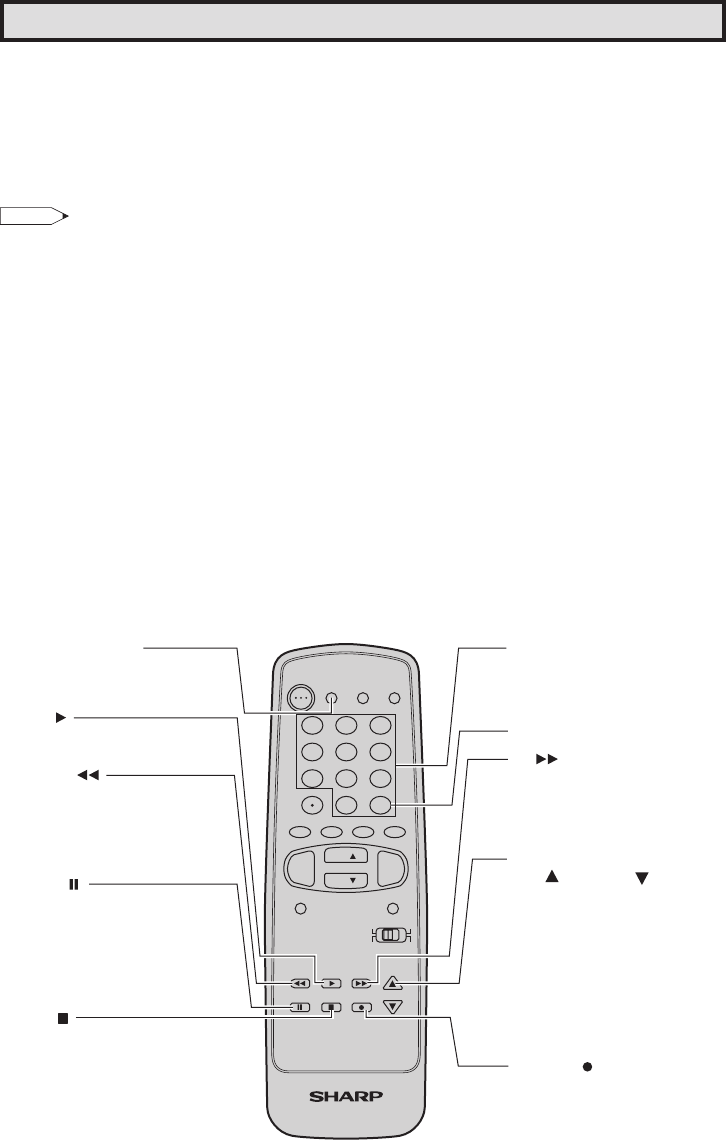
DVD/VCR POWER
Press to turn the VCR or DVD
on and off.
PLAY
Press to playback a tape or disc.
REWIND
Press to rewind a tape or
reverse a disc. For some VCRs
or DVDs you may need to press
STOP first, then REWIND.
PAUSE
Press to temporarily stop the
tape or disc during playback
or recording (VCR only).
Press again to release
PAUSE.
STOP
Press to stop the tape or disc.
REMOTE KEYPAD
Use to enter two-digit code
numbers when identifying your
VCR, DVD and CATV converter.
ENTER
FF
Press to rapidly advance the
tape or disc. For some VCRs or
DVDs, you may need to press
STOP first, then FF.
VCR CHANNEL
UP ( ) / DOWN ( )
Press to scan up or down through
channels on the VCR.
DVD SKIP
Press to jump forward to the
beginning of the next chapter/track,
or backward to the beginning of the
current chapter/track, and
automatically start to play that
chapter/track.
RECORD
Press to begin recording.
(VCR only)
Operation of Universal Remote Control
Universal Remote Control
With the purchase of your television set you
also have received the latest innovation in
remote control technology. With its easy-to-use
push button keyboard, your Remote can
control your television set and most infrared
remote controlled VCRs, cable TV converters
and DVDs as well.
Note:
Depending on the model year produced, brand
and type of VCR, cable TV converter and DVD,
some models may not be compatible with the
remote control.
• Some brands may not enable channel
selection until the ENTER is pressed. In such
case, try the following.
Example:
When you select channel 24,
(1) Press REMOTE KEYPAD “2”.
(2) Press REMOTE KEYPAD “4”.
(3) Press ENTER.
For detailed information on the use of the
Cable TV converter Box refer to their operating
manuals.
Using your Remote with your TV
After installing the batteries, set the CATV/
DVD-TV/VCR on the Remote to the TV
position. (If you can change the channel of the
TV by pressing CH a/s on the Remote
Control, it is in the TV position.)
Identifying VCRs, cable TV converters and
DVDs
Your Remote Control has been set at the
factory to operate your TV and many remote
controlled VCRs, cable TV converters and
DVDs. However, in some cases an easy one-
time set-up step may be necessary before the
Remote will operate accessory VCRs, cable
TV converters and DVDs.
In this set-up step, the Remote locates and
memorizes the remote control transmitter code
for the VCR, cable TV converters and DVDs.
Once “identified”, the Remote sends proper
signals to operate your accessory.
• This identifying step will not have to be
repeated until power to the Remote is
interrupted due to a battery failure.
Using your remote control with a VCR
Once you make certain the Remote Control
has “identified” your remote controlled VCR or
DVD, the Remote is ready to operate your unit.
The various VCR or DVD function buttons on
the Remote will not operate your VCR or DVD
if those features are not already found on your
unit.
All VCR buttons will operate whether the
Remote is in TV or VCR modes.
For detailed information on the use of the VCR
or DVD, refer to the operation manual of the
VCR or DVD.
32SF560(48-51).p65 9/11/05, 1:44 PM48
Page view 47
1 2 ... 43 44 45 46 47 48 49 50 51 52 53 54

Comments to this Manuals

No comments

Electrolux ESF2440 manuels

Manuels d'utilisation et guides de l'utilisateur pour Accessoires pour mélangeurs/transformateurs d'aliments Electrolux ESF2440.
Nous fournissons des manuels en pdf 3 Electrolux ESF2440 à télécharger gratuitement par type de document : Manuel de l'utilisateur


Plus de produits et de manuels pour Accessoires pour mélangeurs/transformateurs d'aliments Electrolux

Modèles Type de document
ESF66810X Manuel de l'utilisateur Electrolux ESF66810X Användarmanual, 48 pages
EKE7100 Manuel de l'utilisateur Electrolux EKE7100 User Manual [fr] [it] , 28 pages
ESF662 Manuel de l'utilisateur Electrolux ESF662 Användarmanual [ar] , 36 pages
EKE6101 Manuel de l'utilisateur Electrolux EKE6101 User Manual, 28 pages
ESL66020 Manuel de l'utilisateur Electrolux ESL66020 Användarmanual [bs] [hr] , 48 pages
ESF6250X Manuel de l'utilisateur Electrolux ESF6250X Användarmanual [de] , 44 pages
EKD6144 Manuel de l'utilisateur Electrolux EKD6144 User Manual, 32 pages
ESL64022 Manuel de l'utilisateur Electrolux ESL64022 Användarmanual, 48 pages
ESF45010 Manuel de l'utilisateur Electrolux ESF45010 Användarmanual, 48 pages
EKC70153 Manuel de l'utilisateur Electrolux EKC70153 User Manual [et] , 52 pages
ESL6620RO Manuel de l'utilisateur   Electrolux ESL6620RO Brugermanual, 72 pages
EOB98000X Manuel de l'utilisateur Electrolux EOB98000X Användarmanual, 44 pages
EKC 7188 Manuel de l'utilisateur Electrolux EKC 7188 Användarmanual, 36 pages
EKD60760X 230V Manuel de l'utilisateur Electrolux EKD60760X 230V Användarmanual, 64 pages
ESF46010 Manuel de l'utilisateur Electrolux ESF46010 Användarmanual, 48 pages
ESL6610RO Manuel de l'utilisateur   Electrolux ESL6610RO Brugermanual, 68 pages
EKD514500X Manuel de l'utilisateur   Electrolux EKD514500X User Manual, 60 pages
COOKER,EKE60010 230V Manuel de l'utilisateur Electrolux COOKER,EKE60010 230V User Manual [en] , 36 pages
ESI65010U Manuel de l'utilisateur Electrolux ESI65010W Användarmanual, 48 pages
ESL7310RA Manuel de l'utilisateur   Electrolux ESL7310RA Ohjekirja [ja] [zh] , 40 pages