Sharp MX-M363N Setup Guide Page 37

  • Download
  • Add to my manuals
  • Print
  • Page
    / 48
  • Table of contents
  • TROUBLESHOOTING
  • BOOKMARKS
  • Rated. / 5. Based on customer reviews
Page view 36
35
MAC OS X
+
14
Configure the printer driver.
The procedure for configuring the printer driver varies depending on the operating system version. The procedure for versions
10.4.11 and 10.5 - 10.5.5 and the procedure for other versions are explained separately below.
The machine can print using the IPP function. If you wish to use the IPP function, see "Printing using the IPP function"
(page 37) to configure the printer driver settings.
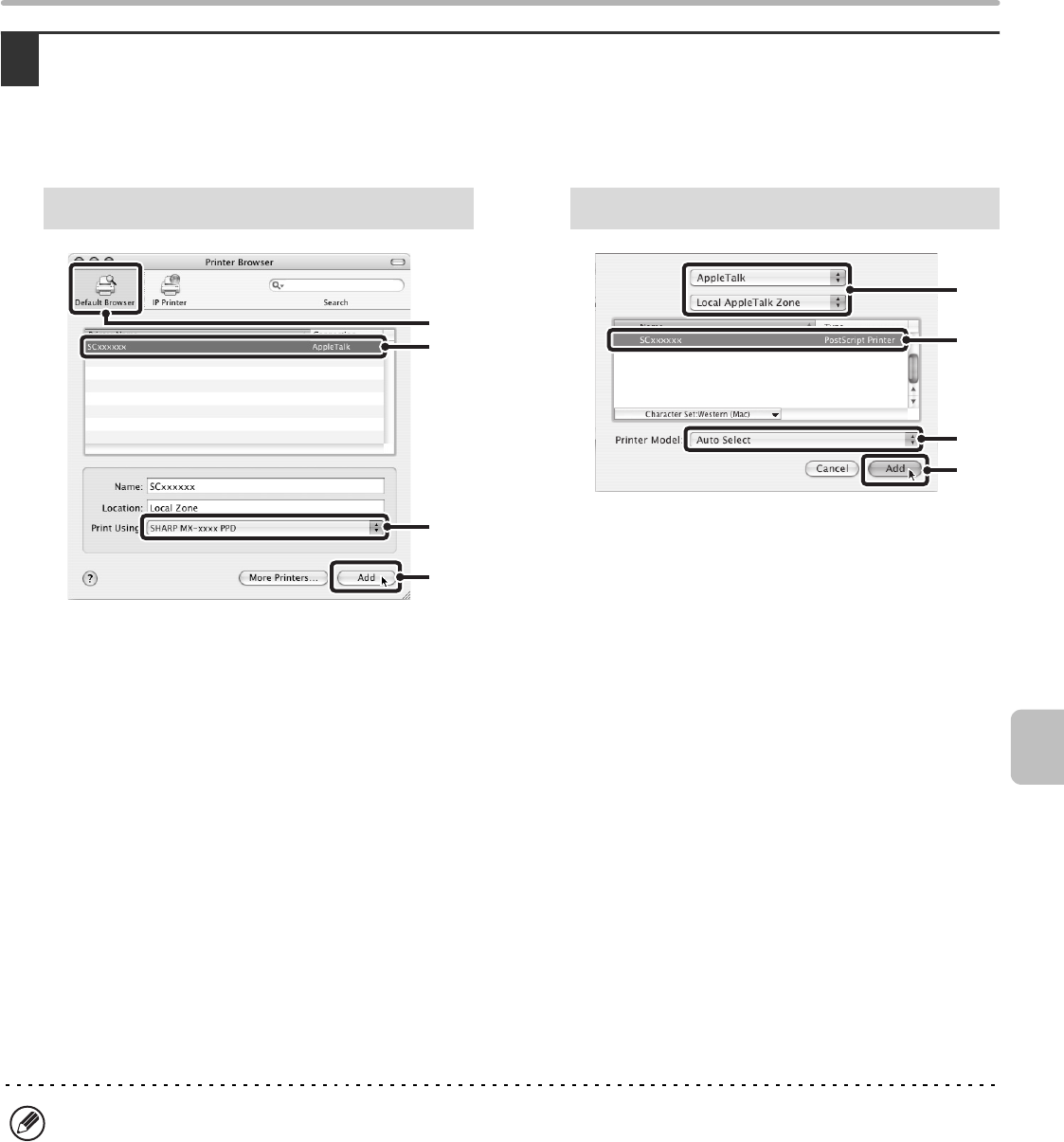
(1) Click the [Default Browser] icon.
If multiple AppleTalk zones are displayed, select
the zone that includes the printer from the menu.
If you are using Mac OS X v10.5 to 10.5.5, click
the [Default] icon.
(2) Click the machine's model name.
The machine's model name usually appears as
[SCxxxxxx]. ("xxxxxx" is a sequence of
characters that varies depending on your model.)
The PPD file of the machine is automatically
selected.
(3) Make sure that the PPD file of your
model is selected.
(4) Click the [Add] button.
The PPD file of the machine is automatically
selected and the peripheral devices installed on the
machine are detected and automatically configured.
(1) Select [AppleTalk].
If multiple AppleTalk zones are displayed, select the
zone that includes the printer from the menu.
(2) Click the machine's model name.
The machine's model name usually appears as
[SCxxxxxx]. ("xxxxxx" is a sequence of characters
that varies depending on your model.)
(3) Select the PPD file of the machine.
If you are using Mac OS X v10.3.9, select [Auto
Select].
If you are using Mac OS X v10.2.8, select [Sharp]
and click the PPD file of your model.
(4) Click the [Add] button.
If you are using Mac OS X v10.3.9, the PPD file of
the machine is automatically selected and the
peripheral devices installed on the machine are
detected and automatically configured.
v10.4.11, v10.5 - 10.5.5
(1)
(2)
(4)
(3)
v10.2.8, v10.3.9
(1)
(2)
(4)
(3)
The PPD file is installed in the following folders on the startup disk.
[Library] - [Printers] - [PPDs] - [Contents] - [Resources] - [en.lproj]
!mxm503_us_ins.book 35 ページ 2009年1月22日 木曜日 午後2時21分
Page view 36
1 2 ... 32 33 34 35 36 37 38 39 40 41 42 ... 47 48

Comments to this Manuals

No comments

Trekstor 76816 Handbücher

Bedienungsanleitungen und Benutzerhandbücher für MP3 / MP4-Player Trekstor 76816.
Wir stellen 1 PDF-Handbücher Trekstor 76816 zum kostenlosen herunterladen nach Dokumenttypen zur Verfügung Datenblatt


Trekstor 76816 Datenblatt (2 Seiten)


Marke: Trekstor | Kategorie: MP3/MP4 players | Größe: 0.63 MB |


Inhaltsverzeichnis


Weitere Produkte und Handbücher für MP3 / MP4-Player Trekstor

Modelle Dokumententyp
78012 Datenblatt   Trekstor i.Beat GhettoBlaster mini, 2 Seiten
78512 Datenblatt   Trekstor i.Beat GhettoBlaster, 2 Seiten
74010 Datenblatt   Trekstor i.Beat p!nk 1GB pink, 2 Seiten
76116 Datenblatt   Trekstor i.Beat move M, 2 Seiten
75724 Datenblatt   Trekstor i.Beat move M, 2 Seiten
76024 Datenblatt   Trekstor i.Beat move S 8GB chrom, 2 Seiten
75816 Datenblatt   Trekstor i.Beat move L, 2 Seiten
101045 Datenblatt   Trekstor i.Beat mood FM 2 GB, 2 Seiten
71810 Datenblatt   Trekstor 1GB i.Beat cebrax FM, 2 Seiten
71816 Datenblatt   Trekstor i.Beat cebrax 2.0, 2 Seiten
73810 Datenblatt   Trekstor 2GB i.Beat censo, 2 Seiten
74916 Datenblatt   Trekstor i.Beat cody 4GB, 2 Seiten
74412 Datenblatt   Trekstor i.Beat emo 2GB, 2 Seiten
193354 Datenblatt   Trekstor Vibez 12 GB, 2 Seiten
4016998729249 Datenblatt   Trekstor Vibez 8GB, 2 Seiten
4016998219443 Datenblatt   Trekstor i.Beat organix [FM], 2 Seiten
74612 Datenblatt   Trekstor US5 1GB, 2 Seiten
173824 Datenblatt   Trekstor i.Beat motion 2 GB, 2 Seiten
74312 Datenblatt   Trekstor i.Beat sonix 2GB, 2 Seiten
4016998720109 Datenblatt   Trekstor i.Beat vision DM 1 GB, 2 Seiten