High-Speed Operation
The AR-FX4 Fax Expan-
sion Kit turns the AR-5127
into a Super G3 fax
featuring a fast 33.6 Kbps
modem. Using JBIG data compres-
sion, the AR-5127 can send an A4
(8
1
/2" x 11") size page in under 3
seconds*. This, together with quick on-
line transmission, greatly reduces the
overall time it takes to send faxes.
*Based on ITU-T test chart No. 1 at standard
resolution. Data transmission time only;
does not include protocol transmission time.
350-Number Auto Dialling
The AR-5127 stores up to 50 numbers
for one-touch connections and 300
numbers for three-digit speed dialling.
F-Code Communication
Conforming to the ITU-T F-Code (sub-
address and passcode) standard, the
AR-5127 is capable of F-Code confi-
dential communication, F-Code relay
request transmission and F-Code
memory polling with other fax
machines regardless of the manufac-
turer or model.
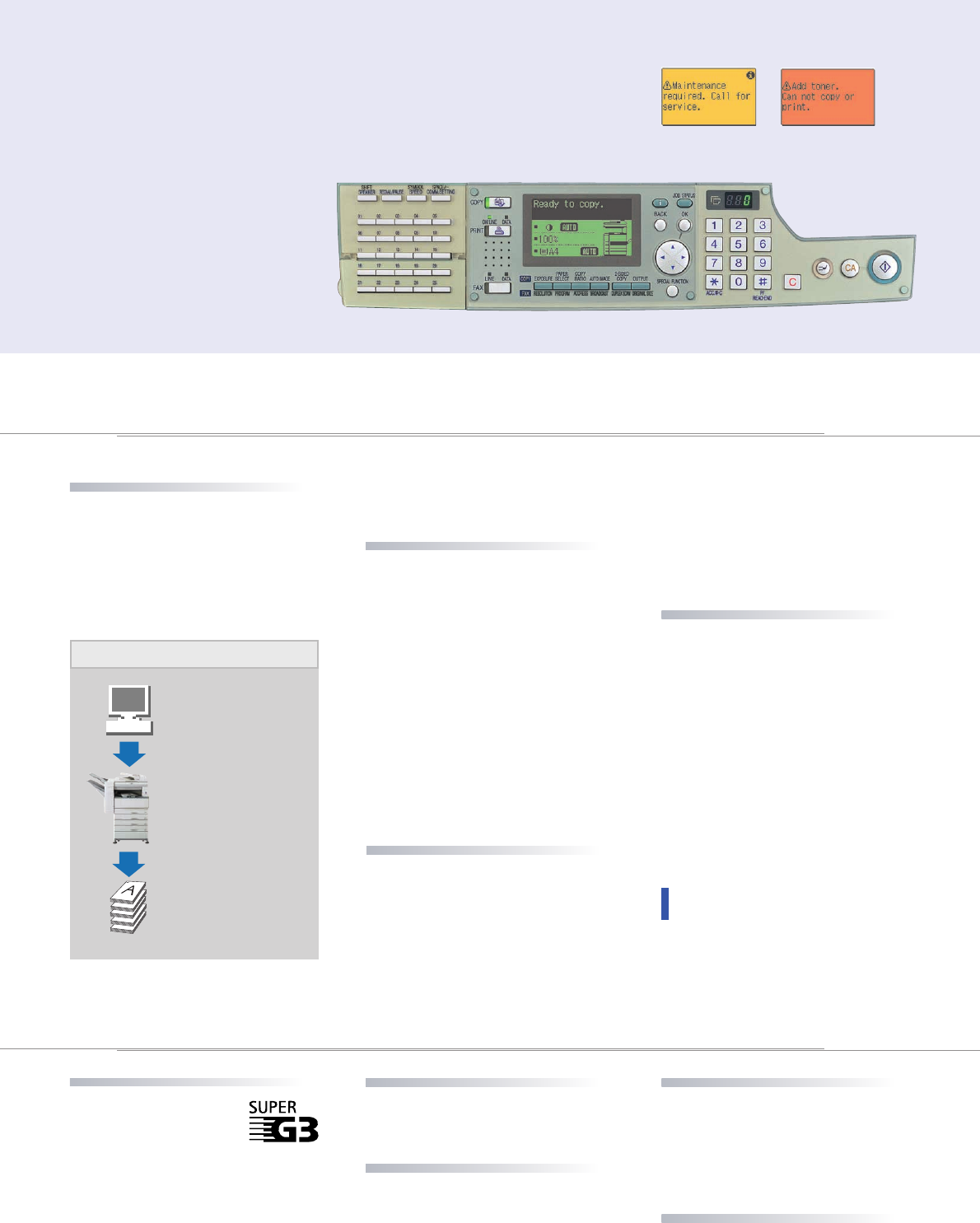
3-Colour Backlit LCD
Green means “ready
to copy”
Yellow indicates
a warning
Orange alerts you
of an error
PRINTING
(option)
AR-5127 stores downloaded print
data in its internal memory for
efficient processing, quickly freeing
up your PC for other tasks.
Job Separator and Job Offset
The AR-5127 ensures your docu-
ments will stay neatly organized
even when others are using the
machine at the same time. A conve-
nient Job Separator* outputs printed
documents onto a separate tray,
preventing them from getting mixed
in with copies or faxes. And to make
it easier to locate and retrieve your
documents from the tray, the
AR-5127’s Job Offset** function
stacks the print jobs slightly offset
from one another.
*Requires optional AR-EB4 and AR-TR3.
**Requires optional AR-EB4.
Support for Most Windows
®
Operating Systems
The AR-5127 can be used with most
Windows
®
operating systems,
including Windows
®
95/98/Me,
Windows NT
®
4.0, Windows
®
2000
and Windows
®
XP*. It also supports
10Base-T/100Base-TX networks**.
*The AR-5127 can operate under Windows
XP, although it has not yet received WHQL
(Windows Hardware Quality Labs) certifica-
tion.
**For PC network connection, a commer-
cially available print server card must be
supplied by the user. Ask your Sharp dealer
for details.
Productive Printing
Functions
The AR-5127 offers a host of conve-
nient printing functions, taking your
office productivity even further. The
N-up function allows you to place up
to four pages of a document together
on a single sheet to save printing
costs. The Fit to Page function saves
you time by automatically selecting
the appropriate reduction/enlarge-
ment ratios to match the selected
paper size. And an optional Staple
Finisher gives you powerful finishing
capabilities for your documents.
RIP Once/Print Many for
Efficient Printing
When equipped with the AR-EB4
Dual Function Board, the AR-5127
becomes a high-speed laser printer,
allowing you to make high-quality
documents right from your desktop.
Featuring Sharp Printer Language
with Compression (SPLC) and RIP
Once/Print Many printing, the
In addition to the logically designed
operation panel, the AR-5127 is
equipped with an informative LCD
panel that illuminates in one of three
different colours: green for “ready”,
yellow for “warning”, and orange for
any errors. At a glance, you’ll know
the status of the machine, even from
a distance. Plus it features an intuitive
graphical user interface that offers
step-by-step guidance through various
operations and functions.
Example:
Printing out
5 sets of a multi-paged
document
Compressed data is sent
once from PC
Data is stored in memory
RIP once/print many
Pages are electronically
sorted, printed out and
stapled
5 sets of stapled
documents, ready to use!
Total Printing Control from a PC
Duplex Scanning
When equipped with the optional
RSPF, the AR-5127 can automatically
scan both sides of a two-sided
document. Once scanned, the pages
are sorted in memory and transmitted
in the proper order.
Quick On-Line Transmission
The AR-5127 starts dialling and transmit-
ting a multi-page document as soon as
the first page is scanned into memory.
This greatly reduces the overall time it
takes to send the document.
FAXING
(option)-
OTHER OUTSTANDING
FEATURES
• Wide zoom range from 50 to 400%
(25 to 400% with AR-EB4)
• Auto paper/magnification selection
• Toner Save mode

 (40 pages)

 (47 pages)
 Manymanuals.com
 Manymanuals.de
 Manymanuals.fr
 Manymanuals.it
 Manymanuals.pl
 Manymanuals.cz
 Manymanuals.es
 Manymanuals-pt.com
Comments to this Manuals