Sharp XL-E171DVH Specifications
Browse online or download Specifications for Home audio sets Sharp XL-E171DVH. Sharp XL-E171DVH home audio set User Manual
- Page / 38
- Table of contents
- TROUBLESHOOTING
- BOOKMARKS

- 11/8/24 08_XL-E171DVH_EN.fm 1
- Introduction 1
- Special Note 1
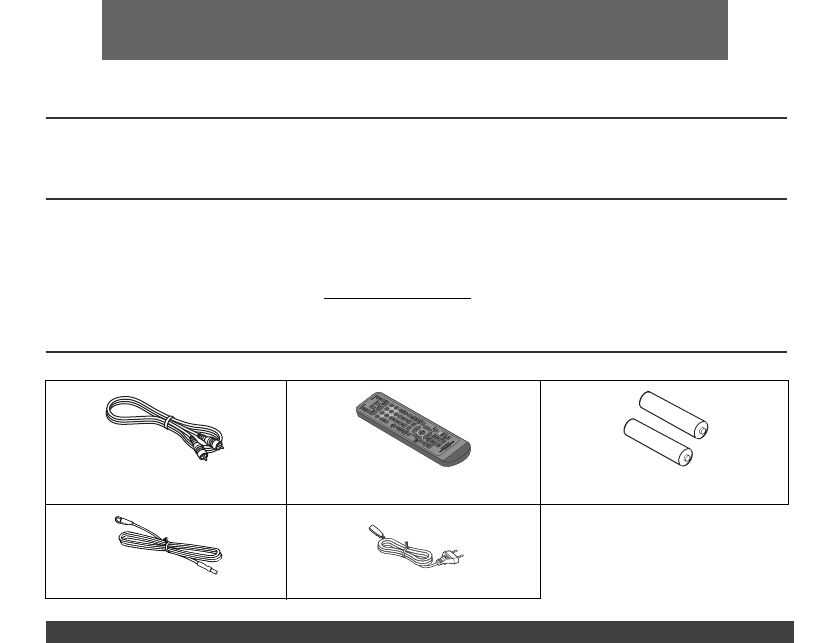
- Accessories 1
- Precautions 2
- Controls and indicators 2
- Types of playable discs 5
- Description of discs 6
- System connections 7
- 11/9/8 08_XL-E171DVH_EN.fm 8
- Remote control 8
- Changing the setup menu 9
- General control 14
- Setting the clock ( 15
- DVD playback 15
- Basic operation 16
- Useful operation 18
- Various settings 20
- CD operation 23
- MP3/WMA folder mode (disc) 26
- MP3/WMA playback (USB Audio 26
- Function) 26
- Listening to the radio 30
- Enhancing your system 35
- Troubleshooting chart 36
- Maintenance 37
- Specifications 38
Summary of Contents
11/8/24 08_XL-E171DVH_EN.fmE-1● XL-E171DVH DVD Hi Fi Component System consisting of XL-E171DVH (main unit) and CP-E171 (speaker system). IntroductionT
11/8/24 08_XL-E171DVH_EN.fmE-1087654321Changing the setup menu (continued)Setup menuSelectable parameters (* indicates default setting) DescriptionAUD
11/8/24 08_XL-E171DVH_EN.fmE-11Changing the setup menu (continued)Setup menu Selectable parameters (* indicates default setting) DescriptionVIDEO SETU
11/8/24 08_XL-E171DVH_EN.fmE-1287654321Changing the setup menu (continued)(*1) Selects the dynamic range compression to fit the individual listening s
11/8/24 08_XL-E171DVH_EN.fmE-13Changing the setup menu (continued)1 Select “PREFERENCE” on the setup menu screen (seesteps 1 - 3 on page 9).2 After se
11/8/24 08_XL-E171DVH_EN.fmE-1487654321General control Press the ON/STAND-BY button to turn the power on.To dim the display brightness, press the DEMO
11/8/24 08_XL-E171DVH_EN.fmE-15Setting the clock (Remote control only)In this example, the clock is set for the 24-hour (00:00) display.To confirm the
11/8/24 08_XL-E171DVH_EN.fmE-1687654321DVD playback (continued)Notes:● During disc initialisation, the volume cannot beadjusted.● Stop positions may b
11/8/24 08_XL-E171DVH_EN.fmE-17Basic operation (continued)You can playback the desired tracks with titles or chaptersin a specific order. Maximum of 2
11/8/24 08_XL-E171DVH_EN.fmE-1887654321Useful operationYou can freeze the picture during playback.Note:The sound is muted during still picture.You can
11/8/24 08_XL-E171DVH_EN.fmE-19Useful operation (continued)You can play a chapter (track) or a title repeatedly byspecifying it during playback.Cautio
11/8/24 08_XL-E171DVH_EN.fmE-287654321Precautions● Use the unit on a firm, level surface free from vibration.● Place the speakers at least 30 cm (12&q
11/8/24 08_XL-E171DVH_EN.fmE-2087654321Various settings The subtitle language, audio language and TV type youselect during playback are reset each tim
11/8/24 08_XL-E171DVH_EN.fmE-21Video CD and Super Video CD playbackThe following playback functions are the same as DVDor CD operations.PageTo locate
11/8/24 08_XL-E171DVH_EN.fmE-2287654321Video CD and Super Video CD playback (continued)You can playback a desired track by selecting one from the6 dis
11/8/24 08_XL-E171DVH_EN.fmE-23CD operationThis system can play back a standard CD, CD-R/RW in theCD format, but cannot record on them.Some audio CD-R
11/8/24 08_XL-E171DVH_EN.fmE-2487654321DivX/MP3/WMA (disc) operation and JPEG (disc/USB video) operation (continued)You can play CD-R/RW recorded in t
11/8/24 08_XL-E171DVH_EN.fmE-25DivX/MP3/WMA (disc) operation and JPEG (disc/USB video) operation (continued)Repeat play on the MP3/WMA menu screen:Con
11/8/24 08_XL-E171DVH_EN.fmE-2687654321MP3/WMA folder mode (disc) operationTo play back MP3/WMA (Windows Media Audio) file There are many music sites
11/8/24 08_XL-E171DVH_EN.fmE-27MP3/WMA playback (USB Audio Function) (continued)By using the Direct Search, the desired tracks on thecurrent disc can
11/8/24 08_XL-E171DVH_EN.fmE-2887654321MP3/WMA playback (USB Audio Function) (continued)Repeat play can play one track, all tracks or a programmedsequ
11/8/24 08_XL-E171DVH_EN.fmE-29MP3/WMA playback (USB Audio Function) (continued)Notes:● SHARP will not be held liable for the loss of data whilstthe U
11/8/24 08_XL-E171DVH_EN.fmE-3Controls and indicators (continued)Page1. Remote Control Transmitter . . . . . . . . . . . . . . . . . 82. On/Stand-by
11/8/24 08_XL-E171DVH_EN.fmE-3087654321Listening to the radioNotes:● When radio interference occurs, auto scan tuning maystop automatically at that po
11/8/24 08_XL-E171DVH_EN.fmE-31Using the Radio Data System (RDS)RDS is a broadcasting service which a growingnumber of FM stations provide. These FM s
11/8/24 08_XL-E171DVH_EN.fmE-3287654321Using the Radio Data System (RDS) (continued)If any of the following events occur, it does not meanthat the uni
11/8/24 08_XL-E171DVH_EN.fmE-33Using the Radio Data System (RDS) (continued)Timer and sleep operation (Remote control only)Timer playback:The unit tur
11/8/24 08_XL-E171DVH_EN.fmE-3487654321Timer and sleep operation (Remote control only) (continued)Notes:● When performing timer playback using externa
11/8/24 08_XL-E171DVH_EN.fmE-35Timer and sleep operation (Remote control only) (continued)The tuner, DISC, USB, Audio In and Line In can all beturned
11/8/24 08_XL-E171DVH_EN.fmE-3687654321Troubleshooting chartMany potential problems can be resolved by the ownerwithout calling a service technician.I
11/8/24 08_XL-E171DVH_EN.fmE-37Troubleshooting chart (continued)When this product is subjected to strong externalinterference (mechanical shock, exces
11/8/24 08_XL-E171DVH_EN.fmE-3887654321SpecificationsAs part of our policy of continuous improvement, SHARPreserves the right to make design and speci
11/8/24 08_XL-E171DVH_EN.fmE-487654321Controls and indicators (continued)Page1. USB Indicator . . . . . . . . . . . . . . . . . . . . . . . . . . . .
11/8/24 08_XL-E171DVH_EN.fmE-5Types of playable discsThe DVD player can play back discs bearing any of thefollowing marks:● For unplayable discs, see
11/8/24 08_XL-E171DVH_EN.fmE-687654321Description of discs● The discs above cannot be played at all, or no sound isheard although images appear on the
11/8/24 08_XL-E171DVH_EN.fmE-7System connectionsSupplied FM aerial:Connect the FM aerial wire to the FM 75 OHMS socket andposition the FM aerial wire
11/9/8 08_XL-E171DVH_EN.fmE-887654321System connections (continued)Connect to the TV using an audio cable.To select Line In function:● On main unit: P
11/8/24 08_XL-E171DVH_EN.fmE-9Changing the setup menuTurn on the TV, and switch the input to the “VIDEO 1”,“VIDEO 2”, etc. accordingly.Notes:● During
Related products and manuals for Home audio sets Sharp XL-E171DVH
 (2 pages)
(16 pages)
(20 pages)
(18 pages)
(36 pages)
(2 pages)
(16 pages)
(20 pages)
(18 pages)
(36 pages)
 (37 pages)
 (2 pages)
 (85 pages)
 (34 pages)
© 2020, manymanuals.com. All rights reserved. | 0.034 s |
 Manymanuals.com
 Manymanuals.de
 Manymanuals.fr
 Manymanuals.it
 Manymanuals.pl
 Manymanuals.cz
 Manymanuals.es
 Manymanuals-pt.com
Comments to this Manuals